
Adobe Photoshop Express
Adobe Photoshop Express screenshots (4)


Description Adobe Photoshop Express
Unleash Your Inner Pro: Edit Photos Like a Master with Adobe Photoshop Express
Tired of basic photo apps that limit your creativity? Adobe Photoshop Express brings the power of legendary desktop editing directly to your Android device. This isn't just another filter app—it's a comprehensive, mobile-optimized toolkit designed to transform your snapshots into stunning, share-worthy artwork in seconds. Whether you're a social media enthusiast, a budding photographer, or just want your memories to look their absolute best, this app delivers professional-grade control right in your pocket.
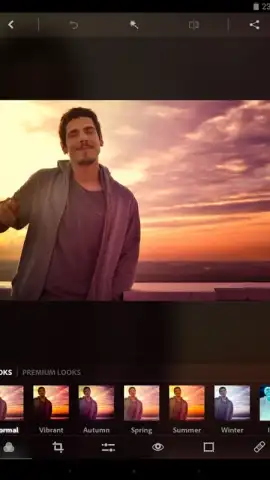
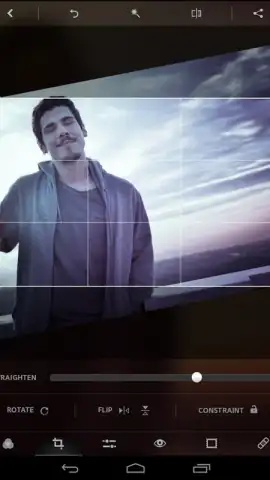
The core of the experience is a massive, intuitive set of tools that go far beyond simple adjustments. Perform precise edits like cropping, straightening, and flipping images with a tap. Dive into advanced color correction with sliders for exposure, contrast, highlights, shadows, saturation, and temperature. Apply a vast library of one-tap visual filters and effects, or get creative with custom borders, textures, and decorative overlays to make your images pop. A standout feature is the robust set of selective edit tools, allowing you to adjust specific colors or convert parts of your photo to classic black & white or sepia tones while leaving the rest in vibrant color.
For users who want a seamless, premium workflow, the optional Turbo upgrade removes all advertisements and unlocks an even smoother editing experience. Furthermore, by creating a free Adobe account, you gain access to 2 GB of integrated cloud storage. This allows you to securely upload, save, and retrieve your projects from anywhere, freeing up valuable space on your phone's internal memory and ensuring your edits are never lost.
Key Features at a Glance
- Execute precise crop, rotate, straighten, and flip adjustments instantly.
- Master color with pro sliders for exposure, contrast, saturation, and white balance.
- Apply dozens of unique filters and create custom looks with advanced editing.
- Use selective color tools and effects like black & white, sepia, and tinting.
- Save projects to 2GB of free cloud storage and edit across devices seamlessly.
Don't just edit—elevate. Download Adobe Photoshop Express now and get exclusive, ad-free access for the first 1,000 users today!
Heads up: you'll need wifi for initial download and cloud sync features. Some premium filters and the full Turbo experience are extra.
 GooglePlay


