

Aladin DM
Aladin DM screenshots (5)


Description Aladin DM
A dedicated download manager engineered for universal file retrieval across all network conditions.
Aladin DM functions as a specialized mobile utility designed to handle direct downloads of internet content to your device storage. Its core architecture is built for reliability across varying connection speeds, including 2G, 3G, and 4G networks, ensuring download tasks proceed without interruption when signal quality fluctuates. The application supports an extensive range of file formats, including executable APK files, multimedia containers like MP4 and MP3, compressed ZIP archives, PDF documents, and virtually any other file type accessible via a direct URL.
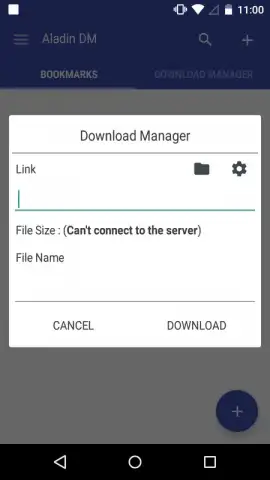
The user interface employs a minimalistic design to reduce operational complexity. Primary functions are accessed through large, clearly labeled buttons, with the central action initiated by tapping the '+' icon to paste a copied download link. Users have the option to rename files upon adding them to the queue for improved personal organization, which is particularly useful for links with ambiguous or coded filenames. A significant operational update removes all advertising interfaces and introduces a Turbo mode, which unlocks enhanced queue management and parallel downloading capabilities.
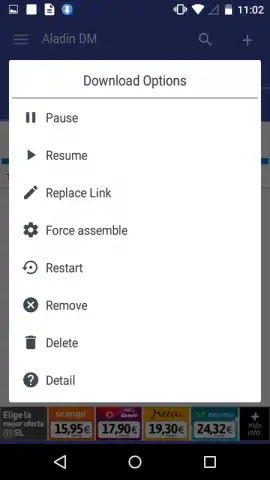
This version introduces support for concurrent download streams, allowing up to three active downloads to proceed simultaneously. Users can construct a managed queue containing up to twelve pending items, with manual controls to pause, resume, or delete any task directly from the list view. This queue system prevents network congestion and helps maintain high transfer speeds for active downloads. The application is optimized for large-file handling, supporting individual files up to 3 GB in size without performance degradation.
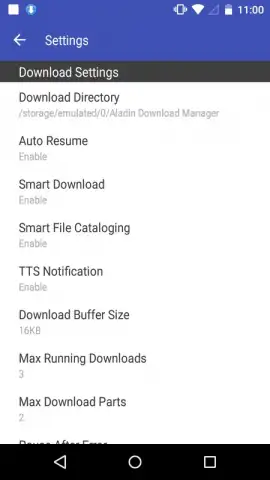
Advanced configuration settings are available for users requiring finer control over the download process. These include the ability to modify the download path for an active transfer and an integrated sorting algorithm that suggests an optimal download sequence within the queue to maximize overall completion speed. The combination of a simplified primary interface and these granular controls makes the application suitable for both novice users and those with technical proficiency.
- Universal file format support for APK, MP4, MP3, ZIP, PDF, and other common file types.
- Optimized network performance across 2G, 3G, and 4G mobile data connections.
- Advanced queue management with support for three simultaneous downloads and a twelve-item queue.
- Large file handling capability for downloads up to 3 GB in size per individual file.
- Configurable download controls including path modification and intelligent queue sorting.
We suggest trying Aladin DM for streamlined management of direct downloads from the web to your Android device. Consider downloading it to handle diverse file types under varying network conditions.
Internet required. IAP available.


