

Apktool M
Apktool M screenshots (11)
Description Apktool M
Unlock Your Android's Hidden Potential with Apktool M
Imagine having complete control over every app on your phone. You see an application icon you don't like, or you need to modify a file to be compatible with an older device. Typically, this requires complex desktop software and technical know-how. Apktool M changes that entire dynamic, placing a professional-grade APK editing suite directly into your hands. This tool transforms your Android device into a mobile workshop, allowing you to personalize, analyze, and modify application packages with an ease that feels almost revolutionary. You are no longer just a user; you become the editor of your own digital experience.
A Deep Dive into Professional-Grade Mobile Editing
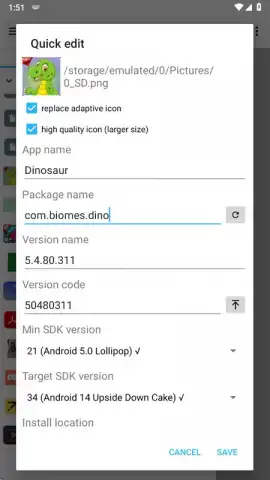
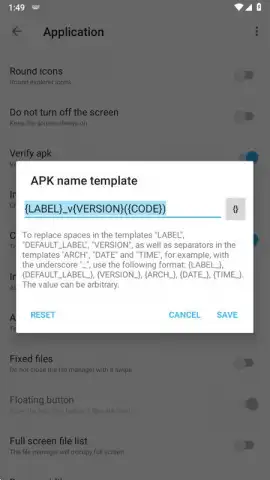
The core experience revolves around the streamlined 'Quick Edit' mode. You select any APK file from your device's storage and are immediately presented with a comprehensive editing panel. Here, you can alter the most visible elements: the application's name and its icon, effectively giving any app a personal rebrand. The modifications go far deeper, however. You have the authority to change the package name, version number, and version code, which is essential for managing multiple instances of the same app. For compatibility, you can adjust the minimum and target SDK levels, allowing older apps to run on newer systems or vice versa. You even control the installation location and can select from multiple signing certificates, with special toggles to enable debugging or optimize the APK for Android TV environments.
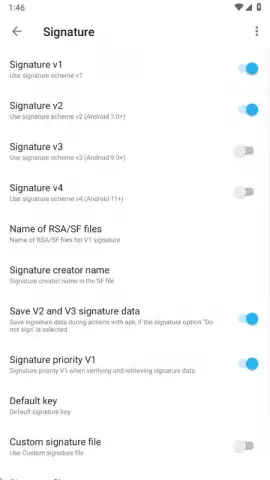
Beyond editing, Apktool M serves as a powerful diagnostic tool. The 'Verify Signature' feature lets you inspect the digital signature of any APK, revealing key details about its origin and integrity in seconds. Conversely, the signature removal tool handles a process that traditionally takes minutes. For those who want to look under the hood, the decompilation function breaks down APK files into their core components within moments. You can scrutinize an app's manifest to see every permission it requests or identify the type of obfuscation protecting its code. Should any feature seem daunting, a detailed FAQ section within the app's options menu provides clear, step-by-step guidance for every tool available.
- Direct On-Device APK Editing: Modify any APK file directly on your Android phone or tablet without needing a computer.
- Quick Edit Suite: Rapidly change an app's name, icon, package identifier, version info, and SDK requirements.
- Advanced Installation Control: Manage installation location and apply custom or alternative signing keys to packages.
- Signature Management Tools: Verify an APK's digital signature for security or remove signatures for modification purposes.
- Full APK Decompilation: Decompile applications to analyze their structure, permissions, and protection methods.
- User-Centric Customization: Create multiple versions of the same app with different icons and names for organization or privacy.
- Ad-Free Experience: The app operates without advertising interruptions, ensuring a focused workflow.
- Comprehensive Guidance: Built-in FAQ and detailed tutorials explain every function clearly.
We suggest trying Apktool M if you have an interest in Android customization, app testing, or simply want to personalize your device beyond standard themes. Consider downloading it to explore the practical power of managing APK files directly from your pocket.
Heads up: you'll need wifi for most features. Some cool stuff is extra.


