
BlueStacks Mobile
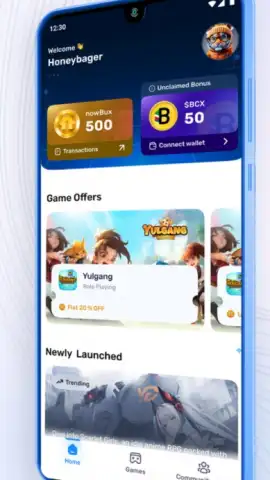
BlueStacks Mobile screenshots (2)
Description BlueStacks Mobile
Your Phone, Reimagined for Power
Imagine holding your entire digital world in your hand, but with the power and precision of a desktop. You tap an app icon, and instead of a limited mobile interface, it opens in a full, resizable window. You drag and drop files between apps like a pro, run multiple programs side-by-side without a stutter, and customize your layout exactly how you want it. This isn't a dream for the future; it's the reality waiting for you right now. BlueStacks Mobile transforms your Android device from a simple touchscreen into a versatile, multi-window powerhouse, giving you the control you've always wanted over your mobile experience.
A Desktop-Grade Experience in Your Pocket
BlueStacks Mobile unlocks a new dimension of productivity and multitasking on your Android device. The core experience revolves around a revolutionary multi-instance and multi-window engine. You can run your favorite apps and games in separate, movable windows, arranging them on your screen just like you would on a computer. This means you can watch a tutorial video in one window while taking notes in another, or chat with friends on social media while browsing the web, all simultaneously and without constantly switching tabs.
The app goes beyond simple window management. It introduces a sophisticated keymapping tool that lets you assign keyboard keys and mouse clicks to on-screen actions for supported apps and games, offering a tactile advantage. For gamers, this means playing mobile titles with the precision of a keyboard and mouse. For everyone else, it means faster, more efficient navigation in complex applications. A dedicated Eco Mode intelligently manages system resources, ensuring that running multiple instances doesn't drain your battery or overheat your device, maintaining smooth performance throughout your session.
Why Your Device Needs This Upgrade
- True Multi-Window Multitasking: Run several apps in separate, resizable windows at the same time.
- Precision Keyboard & Mouse Controls: Map keys and clicks for superior control in games and apps.
- Optimized Performance with Eco Mode: Smarter resource management for cooler, longer sessions.
- Fully Customizable Interface: Arrange your desktop and controls to fit your unique workflow.
This isn't just another launcher; it's a complete paradigm shift. The interface is clean, intuitive, and designed for efficiency, putting every tool at your fingertips without clutter. The performance is optimized to feel seamless, whether you're juggling three communication apps or immersing yourself in a graphic-intensive game. It’s about breaking free from the constraints of standard mobile operating systems and crafting an environment that works for you, not the other way around.
Download BlueStacks Mobile now and command your digital world! Stop accepting limitations. Unlock the full potential of your Android device today and experience a level of control and productivity you never thought possible on a mobile screen. Get it immediately!
Heads up: you'll need wifi for initial setup and downloading instances. Some advanced features and game optimizations are part of optional premium plans. Requires Android 6.0 or higher.


