

Cache Clear
Cache Clear screenshots (4)


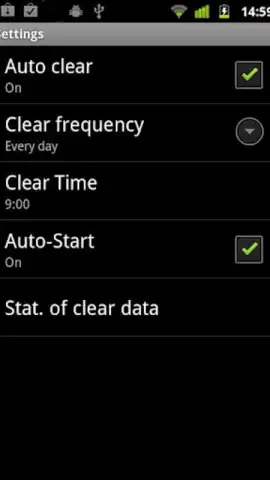

Description Cache Clear
Cache Clear Provides Direct Control Over Device Storage Management
This utility application executes a single core function with precision: the systematic removal of cached data across the installed application ecosystem and web browser. Its operational premise is the direct correlation between accumulated temporary files and potential reductions in system responsiveness and available storage capacity. The interface is configured for immediate one-touch clearing, while also incorporating a scheduling module for automated, periodic maintenance without requiring user intervention for each cycle.
Functional Analysis and Operational Mechanics
The primary utility of Cache Clear resides in its methodical approach to storage optimization. The process targets non-essential data retained by applications and the browser—such as temporary images, script files, and web history traces—which are generated during standard operation but not critical for core functionality. Removal of this data can reclaim significant storage space and may resolve minor performance lag associated with cache overload. The automation scheduler is a distinct feature, allowing users to define a specific time interval—be it daily, weekly, or custom—for the tool to execute its clearing routine autonomously, ensuring the device maintains a baseline level of optimized storage.
- One-Touch System-Wide Cache Purge: Initiates a simultaneous clearing of temporary files from all user applications and the integrated web browser with a single command.
- Comprehensive Browser History and Trace Removal: Extends functionality beyond standard cache to delete browsing history, cookies, and other residual web activity data from the device.
- Fully Automated Scheduled Cleaning Cycles: Configurable scheduler permits setting specific days and times for the app to perform its clearing function automatically, without manual input.
- Ad-Free Operational Experience: The application environment, particularly under its Turbo mode of operation, is maintained without displaying third-party advertisement units during use.
- Minimalist Interface for Immediate Functionality: The design prioritizes direct access to its core cleaning and scheduling tools, avoiding complex menus or unnecessary settings.
We suggest trying Cache Clear if your objective is a utility that performs targeted storage cleanup through both manual and automated means, without extraneous features.
Download the Cache Clear mobile app now.
Note: This application requires an internet connection for initial download and potential updates. The core functionality operates offline. The app is free to use; please check the developer listing for any information regarding optional in-app purchases.


