Disk Usage & Storage Analyzer

Disk Usage & Storage Analyzer

4.7 47 ratings
53 Views
10.11 MB Size
3+ Age

Disk Usage & Storage Analyzer screenshots (5)
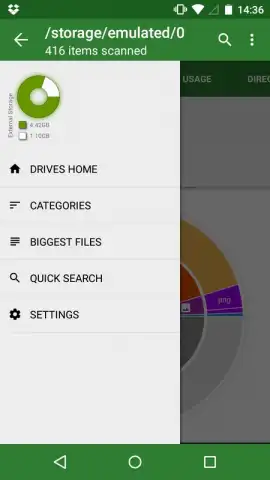
Disk Usage & Storage Analyzer скриншот 1
Disk Usage & Storage Analyzer скриншот 2
Disk Usage & Storage Analyzer скриншот 3
Disk Usage & Storage Analyzer скриншот 4
Disk Usage & Storage Analyzer скриншот 5

Description Disk Usage & Storage Analyzer

A Visual Storage Management Tool for Modern Devices

Over time, any smartphone or tablet inevitably accumulates redundant data—cache files, forgotten downloads, and obsolete documents. While numerous utilities claim to address this clutter, Disk Usage & Storage Analyzer by Mobile Infographics adopts a distinct, graphical methodology. It transforms storage analysis from a tedious manual search into a structured visual audit, allowing for precise file management without inspecting individual items. This application functions as a specialized diagnostic layer over your standard file system, providing categorical insights that typical file managers lack.

Core Analytical and Management Features

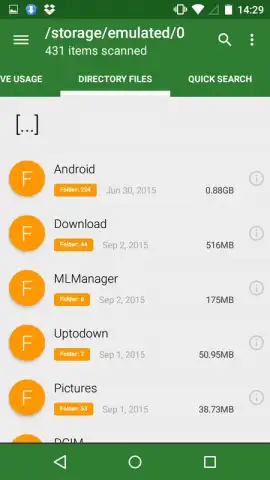
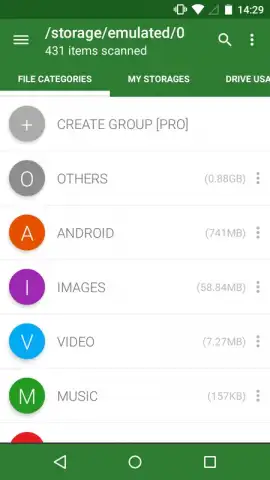
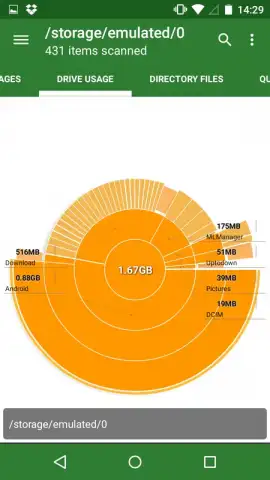
The application's primary interface presents a circular or treemap diagram, visually segmenting internal storage by file category such as applications, videos, images, and audio. Tapping any segment drills down to reveal the specific files within, listed with their individual sizes and storage paths. A key operational feature is the bulk management function, enabling users to select and delete entire groups of files—for instance, all cached data from a particular app or all videos from a messaging service like WhatsApp—with a single action. The sorting filters, which organize content by type, size, or last modified date, add a critical layer of control for targeted cleanup operations.

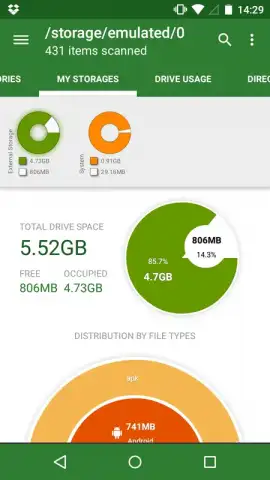
Beyond internal storage, the tool extends its analysis to mounted external SD cards, providing a separate, detailed graphical report for removable media. This dual-scope functionality is essential for devices with expandable storage, as it identifies space-consuming files across all accessible volumes. The process is systematic: select the storage target, analyze the visual breakdown, identify large or obsolete data blocks, and execute removal. The absence of intrusive advertising in its core operations, particularly when leveraging its optional Turbo mode, maintains focus on the task without disruptive interruptions.

  • Graphical Storage Mapping: Provides an immediate, color-coded visual overview of storage allocation across all major file categories and directories.
  • Bulk File Management Tools: Enables one-tap deletion of entire file groups, such as application caches or duplicate media folders, based on custom filters.
  • Dual-Storage Analysis: Independently scans and reports on both internal device memory and external SD card content with detailed interactive charts.

Download Disk Usage & Storage Analyzer immediately to visually audit and reclaim your device's storage space!
Heads up: you'll need wifi for most features. Some cool stuff is extra.

Manually checked and VirusTotal

Latest version

Version
4.1.7.48.free.release
Date
17.03.2026
Signature
b9ac563284d630ffe6ea8e2896ab362f
Architecture
armeabi-v7a, x86, arm64-v8a, x86_64
GooglePlay GooglePlay

About this app

Package name
com.mobile_infographics_tools.mydrive
Min. Android
Android + 7.0
Age
3+

Version history Disk Usage & Storage Analyzer

Disk Usage & Storage Analyzer 4.1.7.48.free.release
17.03.2026
10.11 MB
Disk Usage & Storage Analyzer 4.1.7.43.free.release
17.03.2026
8.9 MB
Disk Usage & Storage Analyzer 4.1.7.39.free.release
17.03.2026
9.94 MB
Disk Usage & Storage Analyzer 4.1.7.38.free.release
17.03.2026
9.77 MB
Disk Usage & Storage Analyzer 4.1.7.37.free.release
17.03.2026
9.91 MB
Disk Usage & Storage Analyzer 4.1.7.35.free.release
17.03.2026
9.59 MB
Disk Usage & Storage Analyzer 4.1.7.34.free.release
17.03.2026
9.59 MB
Disk Usage & Storage Analyzer 4.1.7.33.free.release
17.03.2026
9.59 MB
Disk Usage & Storage Analyzer 4.1.7.32.free.beta
17.03.2026
8.53 MB
Disk Usage & Storage Analyzer 4.1.7.28.free.log.beta
17.03.2026
8.59 MB
Disk Usage & Storage Analyzer 4.1.5.9.free.release
17.03.2026
8.78 MB
Disk Usage & Storage Analyzer 4.1.5.4.free.release
17.03.2026
8.02 MB
Disk Usage & Storage Analyzer 4.1.5.3.free.release
17.03.2026
8.01 MB
Disk Usage & Storage Analyzer 4.1.0.9
17.03.2026
5.07 MB
Disk Usage & Storage Analyzer 4.0.4.3
17.03.2026
4.94 MB
Disk Usage & Storage Analyzer 4.0.4.0
17.03.2026
4.77 MB
Disk Usage & Storage Analyzer 4.0.3.8
17.03.2026
4.69 MB
Disk Usage & Storage Analyzer 4.0.1.9
17.03.2026
4.72 MB
Disk Usage & Storage Analyzer 4.0.1.8
17.03.2026
4.7 MB
Disk Usage & Storage Analyzer 4.0.1.4
17.03.2026
4.7 MB
Disk Usage & Storage Analyzer 3.0.5.4
17.03.2026
3.75 MB
Disk Usage & Storage Analyzer 3.0.4.8
17.03.2026
3.9 MB
Disk Usage & Storage Analyzer 3.0.4.5
17.03.2026
3.77 MB
Disk Usage & Storage Analyzer 3.0.3.7
17.03.2026
2.94 MB
Disk Usage & Storage Analyzer 3.0.3.6
17.03.2026
2.93 MB
Disk Usage & Storage Analyzer 3.0.2.0
17.03.2026
2.8 MB
Disk Usage & Storage Analyzer 2.0.7.5
17.03.2026
1.34 MB
Disk Usage & Storage Analyzer 1.7.3.3
17.03.2026
499.82 KB
Disk Usage & Storage Analyzer 1.6.5.6
17.03.2026
434.29 KB
Disk Usage & Storage Analyzer 1.6
17.03.2026
421 KB
Disk Usage & Storage Analyzer 1.43.5
17.03.2026
393.91 KB
Disk Usage & Storage Analyzer 1.39
17.03.2026
447.25 KB
Disk Usage & Storage Analyzer 1.3
17.03.2026
348.4 KB
Disk Usage & Storage Analyzer 1.0.5
17.03.2026
364.45 KB

Ratings and reviews for Disk Usage & Storage Analyzer

4.7
47 ratings

Leave a review

2 + 9 =
Manually checked and VirusTotal
Latest version
Version
4.1.7.48.free.release
Date
17.03.2026
Signature
b9ac563284d630ffe6ea8e2896ab362f
Architecture
armeabi-v7a, x86, arm64-v8a, x86_64
GooglePlay GooglePlay
About this app
Package name
com.mobile_infographics_tools.mydrive
Min. Android
Android + 7.0
Age
3+