
Fake Windows 8 - Launcher
Fake Windows 8 - Launcher screenshots (3)
Description Fake Windows 8 - Launcher
What Exactly Does the Fake Windows 8 Launcher Deliver for Android?
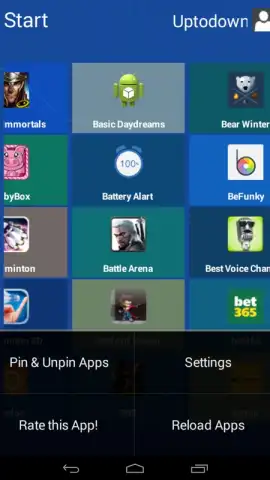
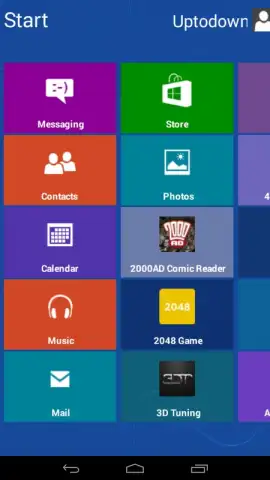
For users seeking to replicate a specific desktop environment on their mobile device, the Fake Windows 8 Launcher by Shadowfax Apps presents a clear proposition. This application functions as a simulation layer, installing the distinctive tile-based interface of Microsoft's Windows 8 operating system onto an Android device. It is crucial to understand its core mechanic: this is not a functional operating system or a file explorer, but a visual shell. Its primary operation is to serve as an alternative home screen, where app icons are replaced with Windows-style live tiles that launch your native Android applications. The utility is narrowly focused on aesthetic customization and nostalgic interface interaction.
The application's operation is straightforward. Upon setting it as the default launcher, your device's home screens are replaced with the familiar Start Screen layout. Tiles can typically be resized, rearranged, and assigned to your installed apps. The launcher mimics the visual grammar of Windows 8, including panoramic backgrounds and the characteristic swipe gestures to navigate between tile groups. It is important to note that this is a surface-level transformation; system-level functions, the app drawer, and underlying Android mechanics remain unchanged. The experience is designed for users who prioritize a unique visual theme over deep functional integration or productivity enhancements.
Core Features and Operational Analysis
- Transforms your Android home screen into a precise visual replica of the Windows 8 Start Screen interface.
- Uses customizable live tiles as launch points for all your existing Android applications and shortcuts.
- Provides classic Windows 8 navigation gestures, such as swiping to reveal different panels of tiles.
- Functions as a standalone launcher, requiring no root access and operating over your current Android OS.
- Offers a niche aesthetic overhaul, focusing solely on visual style rather than adding new system functionality.
This launcher is a definitive stylistic tool for enthusiasts of the Windows 8 UI design language. Its value is almost entirely visual, providing a novel and conversation-starting facade for your device without altering its core capabilities. For a limited time, new users can access the ad-free experience and any performance enhancements directly upon installation.
Download the mobile app now to install this exclusive interface theme—this streamlined version is available for early adopters today only.
Heads up: you'll need wifi for the initial download and setup. Some advanced customization options may be part of extra feature packs.


