

File Converter With Preview
File Converter With Preview screenshots (2)
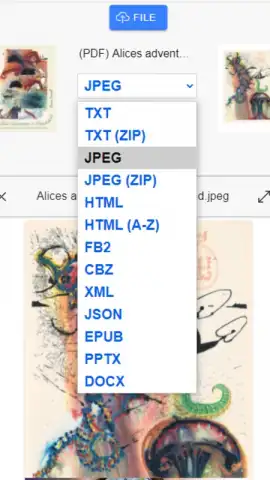

Description File Converter With Preview
Struggling with incompatible file formats that won't open on your device?
File Converter With Preview provides a direct solution for managing and converting documents, images, and media files directly on your Android device. This tool eliminates the need for multiple specialized apps or online services by integrating a powerful converter with a built-in preview function, allowing you to verify content before and after processing.
Core Functionality and Tools
The app operates as a self-contained utility for local file management. You can browse your device's storage, select any supported file, and instantly view its contents in a dedicated preview pane. The conversion engine then processes the selected file into a new format without requiring an internet connection for the core task. It handles batch operations, enabling the conversion of multiple files simultaneously into a uniform format, and organizes output into user-defined directories. The process is designed to maintain file integrity while adjusting compression and quality settings for specific output types.
Key Operational Advantages
The primary strength lies in its offline capability and streamlined workflow. The integrated preview function acts as a safeguard, ensuring you are converting the correct document or image. The interface presents a clear list of source files alongside available target formats, removing guesswork from the process. Performance is optimized for local processing, avoiding upload waits or data usage, and the tool supports a wide range of common format pairs for documents, images, and audio files.
- Convert documents, images, and audio files between dozens of common formats offline.
- Instantly preview file contents before initiating any conversion process.
- Process multiple files at once with batch conversion to save significant time.
- Adjust output parameters like image quality or audio bitrate for precise control.
- Organize converted files into custom folders directly within your device storage.
Download the mobile app now for exclusive, ad-free early access!
This is a limited offer for the first users to gain full, unrestricted functionality. Transform your file management workflow today.
Requires an internet connection for initial setup and potential format pack updates. The app may contain optional in-app purchases for advanced features.


