
Grasshopper Controller
Grasshopper Controller screenshots (4)
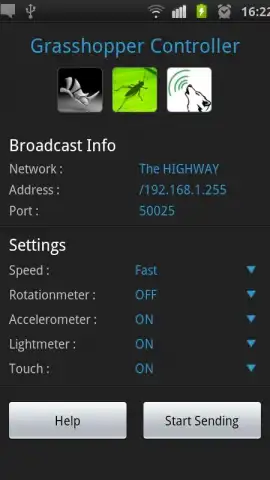
Description Grasshopper Controller
Transform Your Android Device into a Dynamic Grasshopper Control Surface
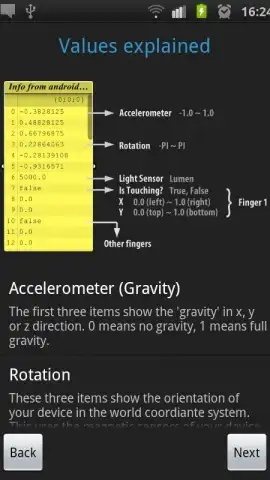
Grasshopper Controller fundamentally redefines the interface between designer and algorithm by turning a standard Android smartphone or tablet into a sophisticated, wireless input device for Grasshopper within Rhino. This application establishes a direct, real-time data pipeline, streaming your device's sensor readings—including accelerometer, gyroscope, and touch inputs—directly into the parametric environment. It moves beyond traditional mouse and keyboard limitations, introducing a layer of physical, intuitive interaction for manipulating geometric parameters, environmental lighting conditions, and complex form-finding scripts. The core value lies in its ability to inject kinetic and tactile feedback into the digital design process, allowing for an exploratory workflow where tilting, rotating, or tapping your device produces immediate visual and geometric consequences in your Grasshopper definition.
The operational mechanics rely on a robust wireless architecture. The app transmits sensor data over a local Wi-Fi network to a listening server on your desktop, facilitated by the essential gHowl plugin for Grasshopper. This setup requires a specific software ecosystem: Rhino (version 4.0 SR8 or compatible), Grasshopper (version 0.8.0066), and the gHowl plugin (r50) must be pre-installed and configured on the host PC. Once linked, the integration is seamless. You can map the device's orientation to control a sun vector for lighting studies, use its rotation to morph a facade pattern, or assign touch sliders on the screen to manipulate a multitude of numeric parameters simultaneously. The application is devoid of advertisements, ensuring an uninterrupted focus on the design task at hand, and includes a comprehensive troubleshooting guide to assist with initial connection protocols and calibration for various Android hardware.
Core Operational Features
- Multi-Sensor Data Streaming: Utilizes the full suite of built-in Android sensors—accelerometer, gyroscope, magnetometer, and touchscreen—to stream real-time orientation, movement, and positional data as usable numeric values into Grasshopper components.
- Wireless Wi-Fi Integration: Establishes a stable, low-latency connection with your Grasshopper workspace via local Wi-Fi, using the gHowl plugin as the data bridge to enable cable-free manipulation of parametric models from across the room.
- Guided Setup & Example Files: Features an integrated help section with clear, step-by-step instructions for configuring both the mobile app and the desktop plugin, including a sample Grasshopper definition file to demonstrate practical application and jumpstart user experimentation.
Detailed Functional Breakdown
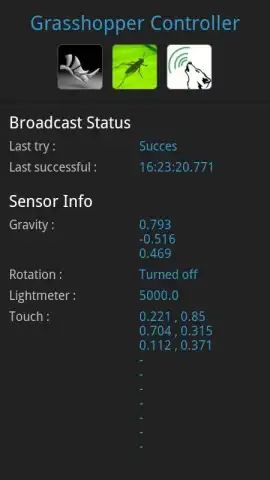
The application’s interface is purposefully minimal, presenting a clean dashboard to monitor connection status, sensor output values, and configurable transmission settings. A key operational detail is its handling of Wi-Fi permissions; the app requires control over Wi-Fi settings to maintain a persistent, stable connection, preventing Android from suspending the data stream during prolonged design sessions. This ensures the interactive link remains reliable, transforming your device into a dynamic control panel. Practical applications are vast: architects can physically walk around a digital massing model while adjusting its curvature with device tilt, or product designers can experiment with organic forms by rotating the device to simulate different perspectives and force vectors. The absence of in-app purchases or subscriptions provides full functionality upon download, emphasizing its utility as a professional tool. Users are encouraged to explore the boundaries of the sensor mappings and provide developer feedback, which actively shapes future updates and compatibility expansions.
Get your bonus of intuitive, kinetic design control and start manipulating your parametric models with unprecedented physicality today.
Internet required. IAP available.


