

Headset Profiler
Headset Profiler screenshots (2)
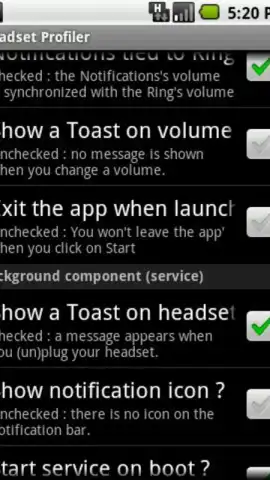
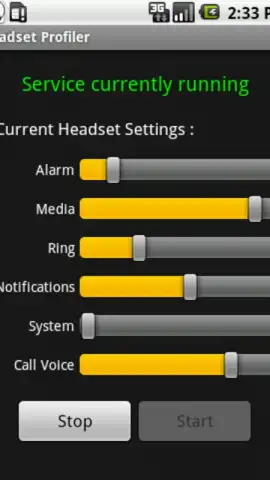
Description Headset Profiler
A Persistent Audio Glitch on Android Finally Has a Dedicated Solution
The fundamental disconnect between a device's speaker volume and its headphone output level remains one of Android's most enduring, minor frustrations. Manually lowering a blaring volume after plugging in headphones, or desperately raising it after unplugging, is a daily ritual that interrupts immersion. Headset Profiler, developed by Emmanuel P, functions as a precise, automated correction to this systemic oversight. It operates on a simple yet profoundly effective principle: detecting the hardware connection state of a wired audio accessory and applying a user-defined volume preset instantly. This transforms a reactive, manual adjustment into a seamless, silent background process, guaranteeing auditory consistency.
Mechanics of Automated Audio Management
The application's core functionality is elegantly straightforward, focusing on reliability over superfluous features. Upon initial launch, users establish a preferred volume level specifically for when headphones are connected. This value is stored persistently. The app then monitors the device's audio jack or USB-C port. The moment a physical connection is made, it overrides the system's current volume setting, applying the stored preset. Conversely, when the headphones are disconnected, the volume can be set to automatically revert to a separate, safe level for speaker use. This cycle of detection and application is near-instantaneous, eliminating the jarring transition between audio outputs. The interface is minimalistic, centered on two primary sliders for 'Headset Volume' and 'Speaker Volume,' with clear toggle switches to activate or deactivate each automation profile.
It is critical to note the application's defined scope: it is engineered exclusively for wired headset connections. Bluetooth audio devices are not supported, as the underlying Android system handles wireless audio profiles differently. This focused approach allows for flawless execution within its domain. The absence of advertisements, as noted in its 'Turbo' version, ensures the automation occurs without unsolicited interruptions, maintaining the purity of its utility function. The app functions as a system-level utility, requiring no ongoing interaction after the initial one-time configuration.
Operational Advantages and Practical Impact
- Eliminates repetitive manual volume adjustments.
- Ensures consistent, safe listening levels automatically.
- Features an extremely minimal, intuitive control interface.
- Operates silently in the background without ads.
The practical benefit is a hands-off audio experience. For commuters, gamers, or anyone who frequently switches between private and public listening, it removes a layer of digital friction. The value proposition is not in adding new features, but in perfecting a basic one that the operating system itself neglects. It provides a set-and-forget solution, where the technology recedes into the background, doing its job so well that its presence is only noticed by the absence of a previous annoyance.
Stop tolerating a flawed default behavior. Download Headset Profiler now and permanently automate this essential setting. Get it immediately and experience audio that simply adapts to you.
Internet required. IAP available.


