

Iconify
Iconify screenshots (3)
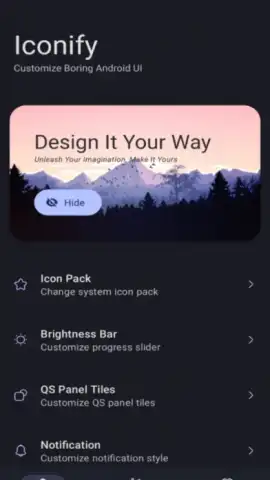
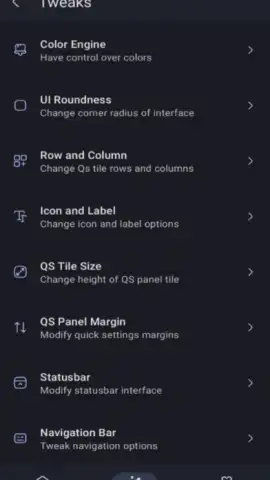
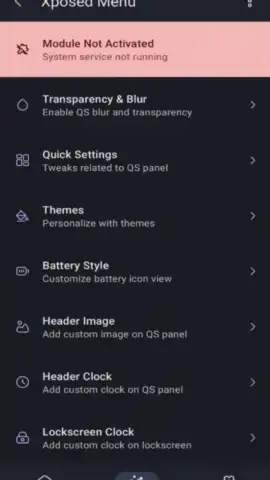
Description Iconify
Unlock a Hidden Layer of Android Customization
For Android enthusiasts who have ever felt constrained by the default interface, the journey to true personalization often hits a technical wall. Standard launchers and theme engines only scratch the surface, leaving core system elements untouched and uniform. This narrative changes with a tool that grants administrative-level access to the operating system's visual foundation. Iconify serves as a modular customization engine, designed for users who seek to alter fundamental aspects of the Android UI that are typically locked away. It operates not as a simple theme app, but as a system-level modifier, requiring specific prerequisites to function but offering unparalleled control in return.
Technical Prerequisites and Core Functionality
Iconify is a free, open-source application that modifies the Android framework directly. Its operation is contingent upon elevated system permissions. The primary requirement is a rooted Android device running version 12 or higher, with root access preferably managed through Magisk or KernelSU. Furthermore, installation of a framework like LSPosed or another Xposed-based system is strongly recommended to enable the module's hooks. Once these conditions are met, the application generates a custom module tailored to your device's ROM. A subsequent reboot applies the changes, integrating the customization layer into the system. The interface itself is designed for precision, providing granular controls over parameters that govern the visual design language of the OS.
Detailed System-Wide Visual Overhaul
The application provides a comprehensive suite of tools for deep visual modification. Users can reconfigure the system icon pack, replacing default application and system service icons universally. It allows adjustment of the Quick Settings panel tiles, including their shape, density, and the visual design of interactive elements like the brightness and volume sliders. The status bar is fully customizable, permitting changes to signal icon styles, battery indicator design, and clock formatting. Beyond icons, the tool enables precise geometry adjustments, such as defining the corner radius for all system windows, notifications, and dialogs. Users can modify the grid layout for system menus, altering the number of columns and rows displayed. Color theming extends across the interface, allowing for recalibration of accent colors, background tints, and text highlights in system applications.
- Modify system icons and status bar.
- Adjust panel geometry and grid layouts.
- Recolor interface elements system-wide.
Exclusive Access to Advanced Customization
This is a specialized tool for a dedicated community of modifiers. For users who have met the technical prerequisites, it represents a gateway to a uniquely personalized device experience that stands apart from standard configurations. The open-source nature ensures transparency and community-driven development, focusing on utility without advertisements or premium paywalls.
Gain exclusive access to this system-level customization suite today. Install Iconify now to begin transforming your Android interface from the ground up. Internet required. IAP available.


