

Niagara Launcher
Niagara Launcher screenshots (4)
Description Niagara Launcher
Imagine your phone’s home screen, cluttered with rows of icons, widgets fighting for space, and the app you need always just out of reach. You unlock your device dozens of times a day, and each time, that visual noise demands a sliver of your attention and a moment of your time. What if, instead, your home screen became a serene, focused command center that anticipated your needs? This is the experience Niagara Launcher crafts for you. It transforms your Android interface from a crowded bulletin board into a streamlined, elegant dashboard that puts speed and simplicity at your fingertips from the very first glance.
A Philosophy of Focused Design
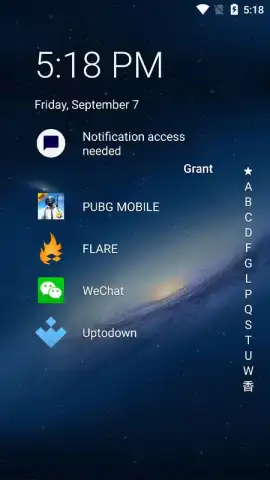
Niagara Launcher operates on a principle of intentional minimalism. It discards the convention of multiple home screen pages filled with icons. Upon your first launch, you are guided to select your essential apps—anywhere from one to eight—which then reside as permanent, readily accessible icons on your main view. This is your core toolkit, always visible and one tap away. The launcher intelligently gets out of the way, occupying minimal screen real estate and system resources, ensuring that your content, not the interface, remains the star of the show.
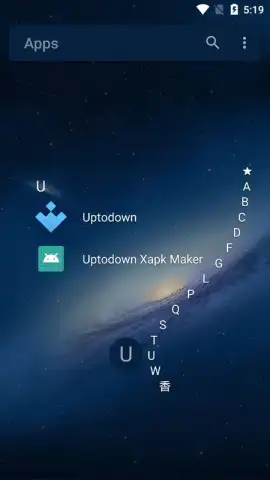
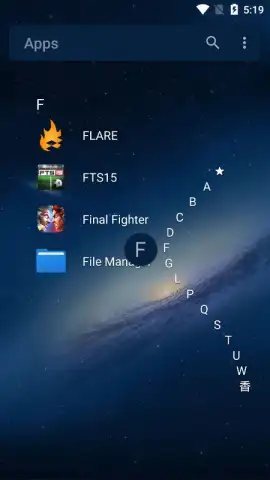
Accessing the rest of your installed applications feels intuitive and swift. A sleek, alphabetized scrollbar appears on the right edge of the screen. A gentle slide of your thumb along this bar lets you fly through your app list, jumping directly to any letter. This eliminates endless swiping or folder diving, turning the task of finding any app into a matter of mere seconds. The design feels premium and responsive, offering a sense of control that traditional launchers often lack.
Notifications That Keep You Present
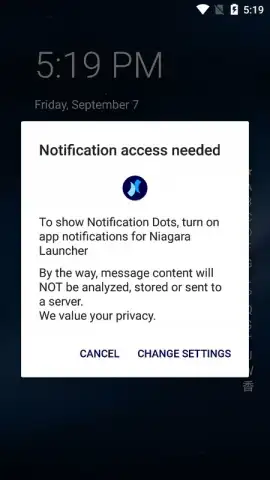
One of the most impactful features redefines how you interact with notifications. Niagara Launcher allows you to preview message content directly on the home screen. For supported messaging apps like WhatsApp, Telegram, or LINE, incoming messages can be read in a concise preview displayed right beneath the app's icon. You gain the context you need without the interruption of fully opening the application. This means you can quickly triage conversations, see if a message requires an immediate reply, or simply stay informed, all while maintaining your focus on the task at front of you. It effectively turns your home screen into a dynamic notification hub.
A Clean Experience, Uninterrupted
The launcher is committed to providing an ad-free environment. This commitment to a clean user experience is further enhanced by optional performance features, often referred to as Turbo modes in similar applications, which aim to optimize animations and scrolling for a consistently smooth feel. The philosophy is clear: offer a wonderful, minimalist design without burdening you with a plethora of gimmicky features and customization options that go unused. You receive a straightforward, powerful interface that emphasizes utility and elegance over complexity.
- Essential Apps at a Glance: Pin between one to eight favorite apps for instant, permanent access on your minimalist home screen.
- Alphabetical Glide Navigation: Use a fast, edge-based scrollbar to jump to any app in your library with a single motion.
- Home Screen Message Previews: Read incoming WhatsApp, Telegram, and LINE notifications directly under their icons without opening the app.
- Lightweight and Ad-Free Design: Enjoy a clean interface with no advertisements, using minimal system resources and battery.
- Focused Functionality: Avoids feature bloat, delivering only a simple, refined, and highly efficient user experience.
We suggest trying Niagara Launcher to experience a genuinely decluttered and efficient Android interface. Consider downloading it now to transform how you interact with your phone every day.
Download mobile app now
Disclaimer: This application requires an internet connection for initial setup and certain optional features. It may contain in-app purchases for premium functionality. Please be aware of your mobile data usage. The app's performance and notification features are dependent on your device's specifications and operating system. Age restrictions may apply based on regional digital store policies. Always review the app's permissions before installation.
 GooglePlay


