

PhotoScan by Google Photos
PhotoScan by Google Photos screenshots (9)
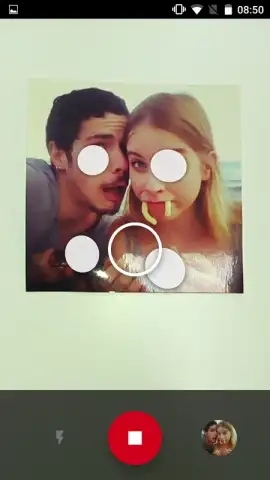








Description PhotoScan by Google Photos
Tired of faded, curled photos trapped in old albums? What if you could digitize them perfectly—without glare, warping, or a bulky scanner—using just your phone? PhotoScan by Google Photos transforms your Android device into a powerful, intelligent scanner, delivering crisp, archival-quality digital copies of your physical prints in seconds.
This official Google app uses advanced computer vision to guide you through a seamless capture process. It automatically detects edges, corrects perspective distortion, and removes glare by combining multiple shots from different angles. The result is a clean, cropped, and enhanced digital image that looks like it was born digital, all saved directly to a dedicated folder on your device.
Core Functionality & Key Tools
PhotoScan operates through a streamlined, guided workflow. You place a photo on a flat surface, view it through your camera, and follow simple on-screen prompts. The app captures several overlapping images to computationally eliminate screen glare and shadows, then stitches and processes them automatically.
- Glare-Free Smart Capture: Takes multiple frames to algorithmically remove reflections and hotspots from glossy prints, ensuring true color reproduction.
- Automatic Perspective & Crop: Instantly corrects skewed angles and intelligently trims away borders and backgrounds for a perfectly framed scan.
- One-Tap Enhancement & Save: Processes images instantly and organizes them into a dedicated 'PhotoScan' folder for easy access and sharing.
The app excels at preserving memories from standard photo paper. For optimal results, ensure the original is centered in the frame and the room is well-lit. While it can't restore severely damaged photos, it guarantees the best possible digitization from a well-preserved print.
Limited Offer: Exclusive Access for First Users!
Don't let your memories fade away. Download PhotoScan by Google Photos today and professionally digitize your entire photo collection in minutes. Get the official Google scanning tool now—this free, premium experience won't last forever!
Technical Disclaimer: This application requires an internet connection for initial download and potential updates. PhotoScan by Google Photos is free to use; no in-app purchases are currently offered. Users should ensure they have sufficient storage space on their device for saved scans. Data usage is minimal during operation. This app is intended for general audiences; parental guidance is suggested for younger users handling historical photos. Google LLC is the developer and data controller; usage is subject to Google's Terms of Service and Privacy Policy.
 GooglePlay


