

Proxy Master VPN
Proxy Master VPN screenshots (5)

Description Proxy Master VPN
Navigating Restricted Networks and Protecting Data
Many users encounter barriers when accessing region-specific content or require a basic layer of privacy on public Wi-Fi. Proxy Master VPN provides a straightforward tool designed to reroute internet traffic through intermediary servers, aiming to circumvent simple geo-blocks and mask the user's IP address during general browsing sessions.
Core Functionality and Server Management
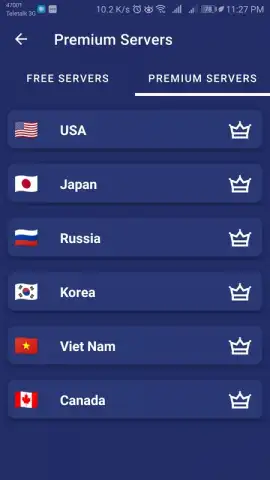
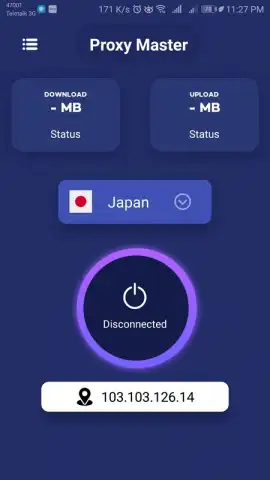
The application operates by establishing a connection between the user's device and a selected proxy or VPN server. Upon launch, users are presented with a server list, typically organized by country. A one-tap connection button initiates the session, with a visible indicator confirming an active connection. The primary function is to change the device's apparent IP address. The app manages the technical process of routing data through the chosen server, which can allow access to websites or services that may be restricted on the local network. It includes a feature to automatically test server speeds or ping times directly within the interface, providing basic metrics for server selection. Connection protocols are handled in the background, with the option to manually disconnect or set preferences for auto-connect on launch.
Operational Characteristics and Interface Design
The utility focuses on providing a no-frills connection service with an emphasis on accessibility. The user interface is built around a central connection switch and a scrollable list of available servers.
- One-Tap Server Connection: Initiate a proxy or VPN session by selecting a country from the list and tapping the connect button, which handles the backend configuration automatically.
- Basic Connection Speed Test: Use the integrated tool to ping available servers, displaying latency to help select the most responsive option for your session.
- Simple Connection Status Dashboard: View clear, real-time indicators for your connection status, current IP address, and selected server location on the main screen.
The design prioritizes minimalism, reducing the process to selecting a location and toggling the connection. Performance is centered on establishing and maintaining a stable tunnel for web traffic without advanced customization features, making it suitable for lightweight browsing tasks.
Consider downloading Proxy Master VPN if your requirement is for a simple tool to change your IP address for basic content access or to add a fundamental layer of privacy on untrusted networks.
Disclaimer: This application requires an active internet connection. The effectiveness in accessing specific content depends on server availability and the blocking methods used by websites or networks. Using a VPN or proxy may violate the terms of service of some platforms. Data usage will increase due to encryption overhead. Please be aware of your local regulations regarding the use of such tools. This is a utility application and does not contain in-app purchases or age-restricted content.


