

pulWiFi
pulWiFi screenshots (3)
Description pulWiFi
Understanding Your Network's Security Posture
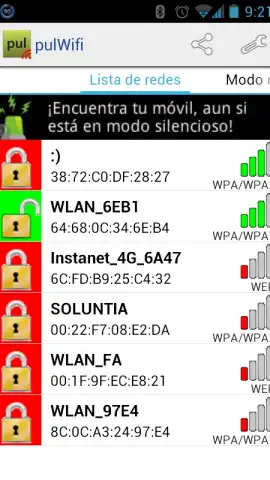
A common oversight in home and small office network management is the reliance on default or weak wireless passwords, leaving the network perimeter vulnerable. The pulWiFi application functions as a diagnostic utility for Android, designed to audit the visible security status of nearby Wi-Fi access points. Its primary operational mechanic involves scanning for broadcast SSIDs and attempting to identify their associated passwords from a local database of common manufacturer defaults. The interface presents an immediate visual assessment, categorizing networks with identified credentials in green and those without in red. This provides a factual snapshot of which networks in the vicinity may be operating with potentially compromised security keys.
Core Functionality and User Interface Mechanics
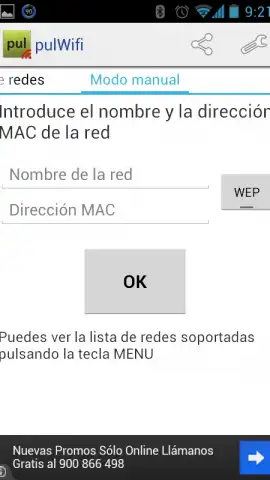
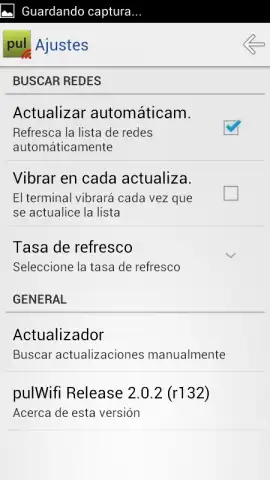
Upon launch, the application performs an automatic scan, populating a list with all detectable Wi-Fi networks. User interaction is centered on this list; tapping on any entry marked in green reveals the password string that the application has matched. A built-in function allows for this password to be copied directly to the device's clipboard for use. The settings menu offers procedural customizations, including the ability to set a scan refresh interval and to enable haptic feedback—a device vibration—upon each completed scan cycle. This transforms the tool from a passive scanner into an active monitoring utility, though its effectiveness is contingent upon the comprehensiveness of its internal credential database.
The application operates without displaying advertising banners or video interstitials during standard use. It is important to note that the tool's intended purpose, as per the developer, is for auditing networks under the user's own administration. The technical capability to view a password for a network does not imply authorization to connect to it. Using this access on networks without explicit permission constitutes unauthorized access and violates computer fraud laws in most jurisdictions.
Application Features and Operational Parameters
- Visual Security Audit: Instantly categorizes nearby Wi-Fi networks by color based on password identification status.
- Credential Database Check: Cross-references found networks against a built-in repository of common default router passwords.
- Direct Clipboard Integration: Allows for one-tap copying of identified passwords for convenient retrieval and use.
- Configurable Background Scanning: Offers settings to auto-refresh the network list at user-defined intervals for continuous monitoring.
- Non-Intrusive Operation: Functions without serving advertisement content, maintaining focus on the utility's core tasks.
The utility presents a straightforward method for users to verify if their own wireless network is secured with a trivial, factory-default password. Identifying this scenario is the first step in remediating a critical security flaw. For network administrators or technically curious users, it provides a factual overview of local wireless security practices.
Download the pulWiFi mobile app now to audit your wireless network's first line of defense.
Disclaimer: This application requires an active internet connection for initial functionality and may offer in-app purchases. Use only on networks you own or have explicit permission to test.


