

Samsung Video Player
Samsung Video Player screenshots (3)
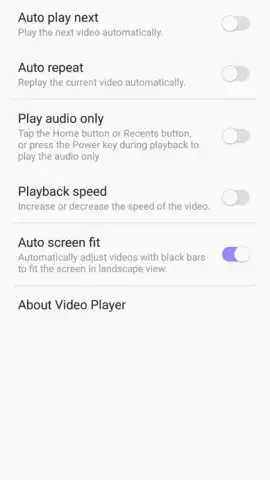


Description Samsung Video Player
The Default Media Engine for Samsung Galaxy Devices
Samsung Video Player represents the integrated multimedia solution pre-installed across the Samsung Android ecosystem. This application functions as the primary handler for video content captured by the device's camera or downloaded and stored locally. Its operation is characterized by direct system-level integration, offering a streamlined playback experience without the need for third-party software installations.
Core Functionality and Configuration
The player provides a standardized set of controls for playback management, including play, pause, and seek functions. A key operational aspect is its configurable playback behavior, accessible through the settings menu. Users can define the sequence of video playback, opting for either automatic continuation to the next file in the directory or a single-play mode that stops at the end of each video. Furthermore, the application offers display scaling options, allowing viewers to match the video to the screen, stretch the content, or preserve the original aspect ratio to avoid distortion.
The software is distributed without third-party advertising banners or video interstitials. Its performance is optimized for the Samsung hardware and software environment, aiming for efficient battery use and memory management during video decoding and playback. The interface is designed for clarity, typically organizing video files by date, album, or folder structure native to the device's storage.
- Pre-installed System Integration: Comes as the default video handler on Samsung phones, ensuring immediate compatibility and stability.
- Customizable Playback Rules: Set automatic play-next functions or single-play modes via the dedicated settings panel.
- Adaptive Display Scaling: Choose between fit-to-screen, stretch, or original aspect ratio to control video presentation.
Exclusive Access for First Users
This optimized version is available for immediate download to ensure your device runs the latest stable build. Limited access to this update is prioritized for users seeking guaranteed compatibility.
Download mobile app now
A stable internet connection may be required for initial download and updates. This application supports playback of user-owned video files and does not require in-app purchases for core functionality.


