
Simple Work Clock Pro
Simple Work Clock Pro screenshots (4)
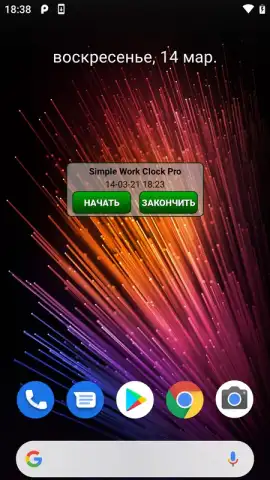
Description Simple Work Clock Pro
The Problem with Modern Time Tracking
Most time-tracking tools are overcomplicated, burdened with unnecessary features that distract from the core task: logging work hours accurately and without friction. This complexity turns a simple daily necessity into a chore, leading to guesswork, forgotten entries, and inaccurate billing or payroll. The cognitive load of navigating a bloated interface is the last thing you need when transitioning between tasks or wrapping up a long day.
A Focused Tool for Professional Time Management
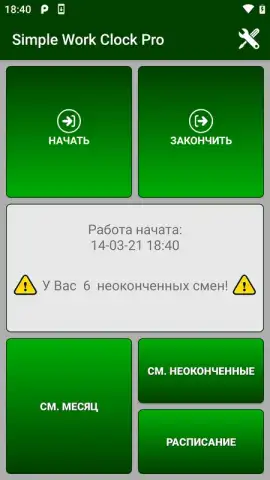
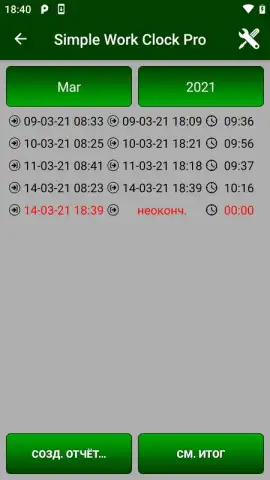
Simple Work Clock Pro operates on a principle of radical simplicity. It functions as a precise, dedicated time clock for your phone, stripping away everything extraneous to focus solely on tracking work periods. The core mechanic is a one-tap system: you press a prominent, central button to clock in, starting a session, and press it again to clock out, stopping the timer. Each session is automatically logged with a precise start and end time, creating a clean, timestamped record. The app provides a straightforward, chronological list of all past work sessions, which can be edited for corrections—such as adjusting a start time you forgot to log—or deleted entirely. For longer-term analysis, you can view your logged time organized by day, week, or month, giving you clear insight into your work patterns and total hours. The interface is designed for zero learning curve, using intuitive icons and a clear visual hierarchy that makes your current status and total logged time immediately apparent.
Key Advantages of the Simplified Approach
The primary strength of Simple Work Clock Pro is its uncompromising commitment to a clean user experience. It avoids the trap of feature creep, ensuring the app remains fast, reliable, and mentally unobtrusive. The visual design is minimal and functional, employing a calm color scheme and ample negative space that directs focus to the timer and controls. Performance is optimized for quick launch and instant response to inputs, so starting or stopping a timer feels immediate and reliable. This combination creates a tool that feels like a natural extension of your workflow rather than an additional administrative task to manage.
- One-Tap Time Tracking: Instantly clock in and out with a single, large central button for zero-friction logging.
- Automatic Session Logging: Every work period is saved with exact timestamps in a clear, chronological history.
- Flexible Time Editing: Correct mistakes by adjusting the start or end time of any recorded session with precision.
- Organized Time Overviews: Review your totals and patterns with daily, weekly, and monthly summary views.
- Clean, Distraction-Free Interface: A minimalist design eliminates clutter, helping you stay focused on your actual work.
We suggest trying Simple Work Clock Pro if you value a no-nonsense, efficient tool for tracking billable hours, monitoring project time, or simply understanding where your workday goes.
Download mobile app now
Disclaimer: This application requires an internet connection for initial download and potential updates. The app may contain in-app purchases for additional pro features. Please be aware of your mobile data usage. The app is rated for all ages but is intended for professional use. Features and specifications are subject to change by the developer.
 GooglePlay


