

Sound Assistant
Sound Assistant screenshots (5)
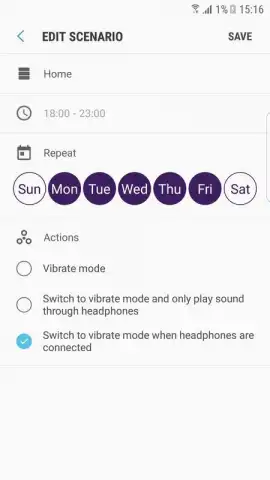
Description Sound Assistant
Tired of One-Size-Fits-All Phone Audio?
Managing sound on a smartphone often feels like a compromise. The system-wide volume slider is a blunt instrument, forcing you to lower your music just to hear a notification, or cranking a game's effects so loud they drown out a voice call. For Samsung Galaxy users, this generic control has been the standard, leaving little room for personalized audio management. Sound Assistant by Samsung Electronics Co., Ltd. directly addresses this by transforming your device's audio controls from a basic toggle into a precise, per-application mixing board. This official utility moves sound management from a system-level afterthought to a foreground priority, offering granular control that adapts to your daily routines rather than forcing you to adapt to it.
A Detailed Look at the Audio Control Features
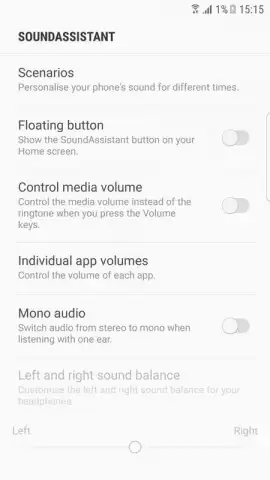
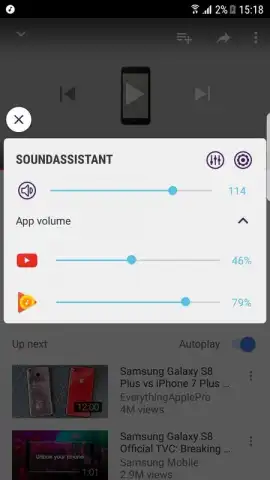
At its core, Sound Assistant redefines the function of your phone's physical volume keys. Instead of adjusting a single master volume, a press can be configured to control the media volume specifically, bypassing ringtone and notification levels entirely. This is particularly useful when you need to quickly lower a video or song without silencing incoming alerts. The application's most powerful feature, however, is its individual app volume mixer. This panel allows you to set independent volume levels for every application installed on your Galaxy device. You can lower the background music in a game to 30% while keeping voice chat at 100%, or set your music player to 80% and your podcast app to 60%, creating a perfectly balanced audio environment for multitasking.
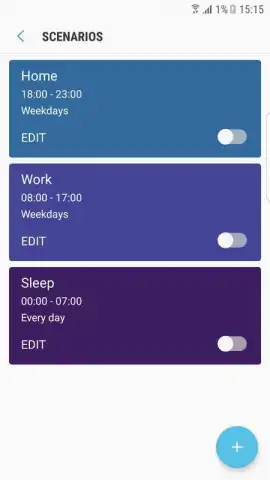
Beyond per-app controls, Sound Assistant introduces a sophisticated system of custom sound profiles. These are not simple presets, but fully configurable audio environments that can be scheduled to activate automatically. You can create a "Work" profile with specific media volumes and vibration intensities, a "Night" profile that mutes all but essential sounds, and a "Commute" profile optimized for podcasts and navigation. The scheduler ties these profiles to time or location, allowing your phone's audio behavior to intelligently shift throughout your day without manual intervention. Furthermore, the app provides a persistent floating button for rapid access to these settings, ensuring that advanced audio control is never more than a single tap away, regardless of what else you're doing on your device.
- Per-App Volume Mixer: Set independent, precise volume levels for each application, from games to streaming services.
- Custom Scheduled Sound Profiles: Create and automate unique audio settings for work, sleep, or commute that activate at set times.
- Enhanced Volume Key Control: Remap your side keys to control media volume directly and adjust levels in finer increments.
Download Sound Assistant for Galaxy Now
For Galaxy users seeking definitive control over their device's audio landscape, this is the essential tool. This is not a third-party mod but an official Samsung application, ensuring deep system integration and stability. The current version offers a refined, ad-free experience that turns sound management into a powerful feature. Install it today to unlock professional-grade audio customization tailored specifically for your Samsung smartphone.
Heads up: you'll need wifi for the initial download and for accessing some online audio databases. Some advanced profile automation features are part of optional premium modules.


