
To-Do List Widget
To-Do List Widget screenshots (2)
Description To-Do List Widget
A Persistent Nudge Toward Completion
There is a particular kind of mental friction that occurs when a task is noted in a dedicated app, only to be buried and forgotten the moment the screen turns off. The intention to act dissolves because the reminder is not persistently present. This is the core problem the To-Do List Widget by developer ChrisBailey addresses directly. It bypasses the need to open an application altogether, transforming a static home screen into a dynamic, interactive command center for daily responsibilities. The principle is elegantly simple: by placing your actionable items in the constant foreground of your digital environment, the barrier to engagement is virtually eliminated, turning intention into action with a single tap.
Core Mechanics and Customization
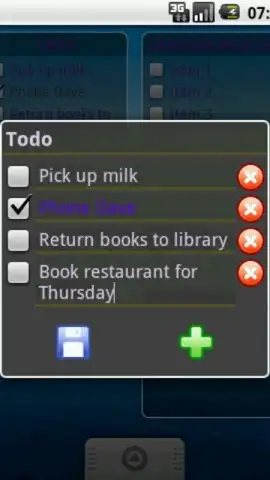
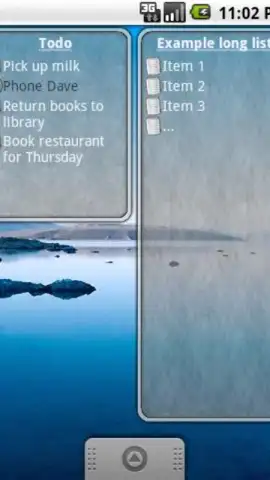
The application functions as a highly specialized widget engine. Its primary interface is not within the app itself, but on your device's home screen after configuration. The setup process involves selecting the widget size from your device's widget menu and placing it in your preferred location. From there, task management becomes a ambient activity. You can add new items, edit existing ones, and, most satisfyingly, mark tasks as complete directly from the widget view, with visual feedback confirming the action. This creates a seamless loop of review and execution that integrates into the natural flow of checking your phone.
Beyond pure functionality, the widget offers a degree of visual personalization that is crucial for a persistent home screen element. Users can adjust the widget's background transparency and color scheme, and select from a variety of icon styles for the checkboxes and action buttons. This is not merely aesthetic; it allows the widget to blend with your chosen wallpaper or stand out as a bold focal point, ensuring it remains visually cohesive with your personal setup while maintaining high legibility for your task list.
Detailed Feature Breakdown
- Direct Home Screen Interaction: Manage your entire list—add, edit, and check off tasks—without ever launching a separate application interface.
- Fully Customizable Visual Design: Modify background colors, opacity levels, and icon styles to match your phone's theme and personal preference.
- Ad-Free Experience with Turbo Performance: The app operates without display advertisements, ensuring fast, uncluttered interactions and reliable widget responsiveness.
The utility of this tool scales with the complexity of your day. It is equally effective for managing a concise grocery list as it is for tracking a sequence of critical work deliverables. By externalizing your cognitive load onto a constantly visible plane, the widget reduces the mental effort required for task recall and prioritization, effectively functioning as a passive productivity system. We suggest integrating this widget into your daily routine to experience a tangible reduction in overlooked tasks and a clearer mental workspace.
Download the To-Do List Widget mobile app now to install this productivity layer directly onto your home screen.
Disclaimer: This application requires an internet connection for initial download and potential updates. The app may contain in-app purchases for advanced customization packs. Please be aware of data usage charges from your provider. The widget functionality is dependent on your device's operating system and home screen specifications. Age restrictions may apply as per store guidelines.


