

Video Eraser
Video Eraser screenshots (3)
Description Video Eraser
Remove Unwanted Objects from Your Videos Effortlessly
Editing a video only to find an unwanted person, text watermark, or distracting object ruining the perfect shot is a common frustration. Manually attempting to paint over or crop out these elements often results in a compromised frame or noticeable, jarring edits. This application provides a focused toolset designed to intelligently analyze video footage and cleanly erase selected elements, aiming to restore the visual flow without the need for complex desktop software.
Core Editing Mechanics and Tools
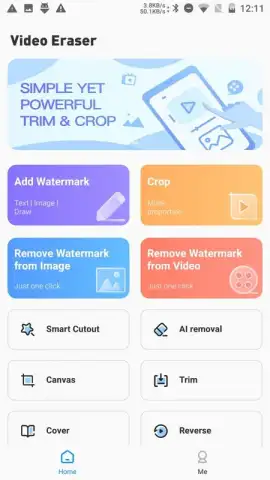
The primary function centers on a frame-by-frame object removal process. Users select the unwanted element by drawing over it, and the algorithm processes the selection, filling the area with a generated background that matches the surrounding pixels and motion. For static backgrounds or simple objects, this can be a one-step operation. For moving objects or complex scenes, the tool offers tracking and manual frame adjustment to ensure consistency throughout the clip. Beyond core removal, the utility includes basic post-processing features to blend the edit, such as blur edge refinement, color correction for the patched area, and a clone stamp tool for precise manual touch-ups.
The workflow is built around a timeline editor where the source video and the edited preview are displayed. Key advantages include the processing speed for shorter clips, which allows for quick previews of the edit, and the non-destructive editing approach, permitting users to revert changes or adjust the removal area at any point before final export. The application supports various export resolutions and maintains the original file format where possible, focusing on delivering a cleaned video file ready for sharing on social platforms or for further editing in other software.
Key Functional Advantages
- Precision Object Selection: Utilize brush and lasso tools to accurately outline static or moving objects for targeted removal.
- AI-Powered Background Reconstruction: Automatically generates matching imagery to fill erased areas, aiming for seamless visual integration.
- Non-Destructive Editing Timeline: Make adjustments or revert any edit without affecting the original source video file.
- Straightforward Export Options: Render final videos in multiple resolutions and standard formats directly from your device.
Get your clean, professional-looking videos today. Download Video Eraser now and remove any unwanted element with precision.
Requires an internet connection for certain processing functions. The app may offer optional in-app purchases for advanced features or to remove watermark exports.


