

Fake Voice Call
Fake Voice Call screenshots (3)


Description Fake Voice Call
What if you could stage a realistic phone call at any time?
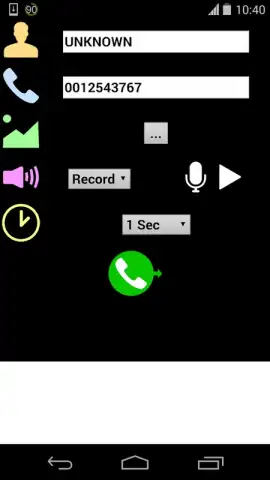
Fake Voice Call by NetApps is a utility application designed to simulate incoming calls with a high degree of user customization. It functions by integrating with your device's native interface to produce a convincing call screen experience. The core mechanics involve the configuration of caller ID details, including custom names, phone numbers, and profile images sourced directly from your gallery. The application provides multiple audio options, allowing users to either select from a library of pre-recorded voice tracks or record their own custom audio messages to simulate a specific conversation. A scheduling feature enables the pre-planning of these simulated calls for a precise time, adding a layer of strategic use for various scenarios. The absence of advertisements, particularly when utilizing the Turbo feature, ensures an uninterrupted user experience focused on functionality.
Core Functionality and Customization
The application operates on a principle of detailed user control to achieve verisimilitude. The process begins with configuring the call's visual and auditory parameters. Users assign a contact name and number, which will be displayed on the incoming call screen. For heightened realism, the app can pull a photograph from the device's local storage to serve as the caller's picture. The auditory component is equally flexible; you can choose a voice from a provided list or create a personalized recording, effectively scripting a dialogue from a friend, colleague, or any other persona. The call utilizes your phone's default ringtone and vibration pattern, ensuring the simulation mirrors a genuine system notification. The scheduled call feature transforms the app from a simple immediate tool into a programmable utility for reminders or planned interactions.
Key Features and Practical Analysis
- Configure full caller ID details with custom names, numbers, and personal photos.
- Select from pre-recorded voice options or record and use your own custom audio.
- Schedule simulated incoming calls to trigger automatically at a set future time.
- Experience an ad-free interface with enhanced performance using the Turbo mode.
- Intuitive controls allow you to accept or decline calls during the simulation.
The interface is designed for immediate usability, with a straightforward layout that guides users through the setup steps without complexity. This accessibility makes it suitable for a wide range of applications, from light-hearted pranks among friends to more practical uses like creating a pretext to exit a situation. It serves as a digital tool for creative role-play, with its effectiveness hinging on the depth of customization employed by the user. The technical execution focuses on replicating standard phone behaviors, making the simulation convincing to an observer.
Download Fake Voice Call immediately and configure your first scenario!
Get it now directly from your app store—do not wait to explore its customizable features!
Disclaimer: This application requires an internet connection for initial download and certain functions. It may offer in-app purchases for additional content or features.


