

Adobe Photoshop Mix
Adobe Photoshop Mix screenshots (8)






Description Adobe Photoshop Mix
A Practical Look at Adobe Photoshop Mix
The process of creating a composite image, where elements from one photograph are seamlessly integrated into another, has traditionally required desktop software and a significant learning curve. Adobe Photoshop Mix addresses this specific creative task directly on a mobile device, providing a streamlined toolset derived from Adobe's professional imaging technology. It functions as a focused companion to the broader Photoshop ecosystem, prioritizing layer-based cutting and blending over a full suite of editing tools. The application requires a free Adobe account for operation, which facilitates cloud saving and integration with other Adobe services, establishing it as a component within a larger creative workflow rather than a standalone, all-in-one photo editor.
Core Functionality and Editing Tools
The central operation of Adobe Photoshop Mix revolves around its cut-out and blend engine. Users begin by selecting a base background image and then importing a second image to layer on top. The application provides several selection tools, including a manual brush for precise outlining and an automatic background removal function, to isolate the desired subject from the upper layer. Once the cut-out is defined, the two layers can be merged with adjustable blending modes and opacity sliders, allowing for control over how the combined elements interact. The interface is designed to make this multi-layer compositing process tactile, with pinch-to-zoom and direct on-canvas adjustments.
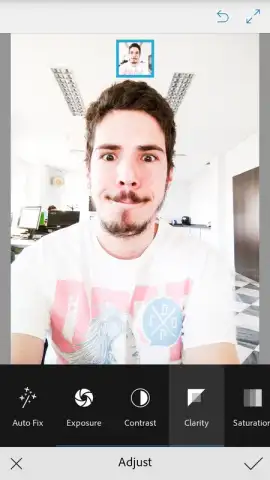
Beyond its primary compositing function, the app includes a secondary set of standard photo adjustment parameters. These allow for non-destructive edits to individual layers or the final composite. The adjustment panel includes manual controls for exposure, contrast, highlights, and shadows, providing basic tonal correction. A collection of preset filters is also available for quick stylistic changes. It is important to note that while these tools are competent, they are supplemental; the app's distinct value is in its ability to perform clean cut-outs and layer management on a mobile device, leveraging Adobe's Sensei technology for edge detection.
Key Feature Set
- Layer-Based Compositing Engine: Precisely combine multiple photos using cut-out tools and blending modes for creative montages.
- Advanced Selection Tools: Utilize both manual brushing and automatic background removal powered by Adobe Sensei AI technology.
- Non-Destructive Adjustments: Apply filters, and fine-tune exposure, contrast, and color on individual layers without permanent changes.
We suggest trying Adobe Photoshop Mix if your mobile editing needs specifically involve merging images or creating multi-layered photo projects with a professional-grade toolset.
Download Adobe Photoshop Mix now.
Disclaimer: This application requires a persistent internet connection for initial login and certain cloud features. It may offer in-app purchases for additional content or services. User data may be collected and used in accordance with Adobe's privacy policy. Some features require a compatible device and operating system version. Please review the terms of service and privacy policy provided by the developer before use.


