

Alli360 by Kids360
Alli360 by Kids360 screenshots (6)



Description Alli360 by Kids360
Ever Feel Like You're Managing Your Child's Screen Time in the Dark?
You set limits, you make rules, but the digital world is a constant pull. Are they actually doing their homework, or have they slipped into a gaming marathon? That nagging worry about balance, about healthy habits, is a modern parenting challenge every single day. It feels like you need eyes everywhere, but what you really need is clarity and control, all from one place.
Your Family's Digital Harmony Hub
Alli360 by Kids360 transforms that feeling of uncertainty into a dashboard of calm understanding. This isn't about spying; it's about guiding and protecting. The app provides a comprehensive toolkit to observe, manage, and balance your child's device activity alongside their real-world schedule. You gain a partner in parenting, helping to foster responsibility and ensure technology is a tool for growth, not a distraction.
The core experience revolves around connection and insight. After a simple setup, you link your device with your child's. From there, a clear, intuitive interface becomes your command center.
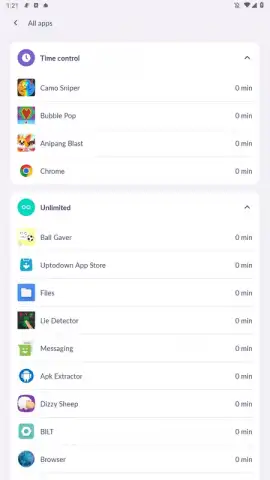
- 360° Activity Overview: See a complete breakdown of how time is spent. View app usage statistics, categorize time into productive, educational, or entertainment, and identify patterns over days and weeks.
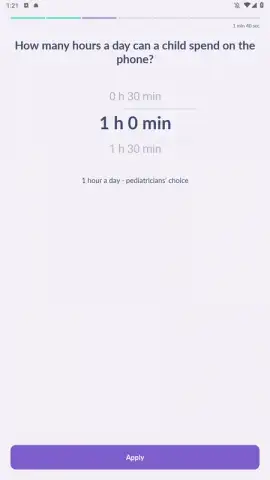
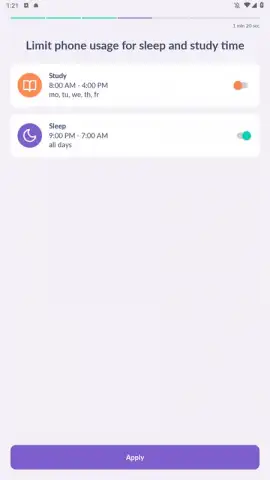
- Smart Scheduling & Limits: Go beyond simple timers. Create custom daily schedules that automatically allow or restrict access to apps and the device itself. Set homework time where only educational apps are available, or establish a device curfew for peaceful nights.
- Instant Location & Geofencing: Peace of mind comes with a tap. Check your child's location on a safe, private map in real-time. Set up secure zones, like home or school, and receive alerts when they arrive or leave these designated areas.
- Task & Chore Manager: Integrate responsibility into their digital routine. Assign tasks and chores directly through the app. You can approve completed tasks and even link rewards to screen time, teaching valuable lessons about earning privileges.
- Emergency SOS & Quick Contact: A dedicated panic button on your child's device sends an immediate alert with their location to your phone. Maintain a trusted contact list for easy, safe calling from their device.
Why This Approach Just Works
The design prioritizes simplicity for you and subtlety for your child. The parental interface is clean and informative, avoiding overwhelming data with clear visuals and actionable insights. On your child's device, the app runs securely in the background, promoting awareness rather than confrontation. It’s about building a cooperative framework for digital wellness that grows with your family.
- Crystal-Clear Dashboard: All critical information—screen time, location, tasks—is presented in an easy-to-scan format. No digging through menus.
- Balanced Control: Tools are designed for guidance, not just lockdown. Flexible scheduling respects your child's need for downtime while protecting priorities.
- Uncompromising Security: All family data and location information are protected with robust encryption, ensuring your family's privacy is always maintained.
- Performance That Keeps Up: The app operates efficiently, providing real-time updates without draining device batteries or slowing down performance.
Create Your Family's Balanced Digital Plan Today
Stop guessing and start guiding. Join thousands of parents who have found a smarter way to navigate the digital landscape with their children. This is your chance to replace worry with insight and conflict with cooperation.
Download Alli360 by Kids360 now and unlock a special introductory period for full feature access. Establish healthy digital habits for your child while you can still shape them.
Requires an internet connection for full functionality. Some advanced features may require a subscription. The app requests necessary permissions for activity monitoring, location services, and app management to provide the described services. Parental setup is required.
 GooglePlay


