

顔文字入力-ANYTYPE
顔文字入力-ANYTYPE screenshots (4)


Description 顔文字入力-ANYTYPE
Tired of Generic Keyboards That Lack Personality?
Standard mobile keyboards offer limited visual customization and repetitive emoji sets, forcing users into a uniform typing experience. This application, ANYTYPE Emoji Input, functions as a fully customizable keyboard platform, enabling the creation of deeply personalized input tools. It is engineered for users who prioritize granular control over their digital interface, transforming the utilitarian act of typing into a form of self-expression.
Core Functionality and Customization Tools
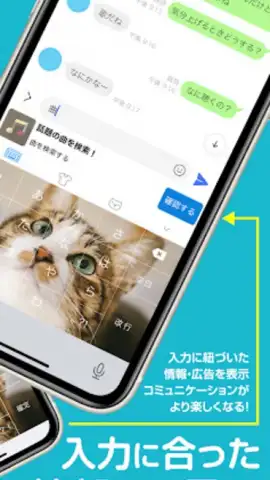
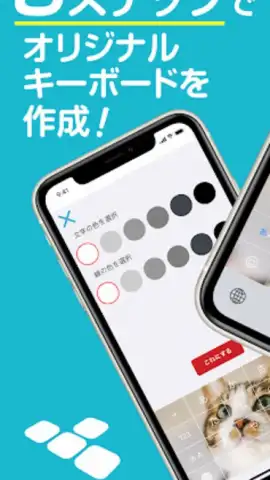
The application operates as a system-wide keyboard replacement, granting extensive control over visual and functional parameters. Users can import personal photographs, curated anime artwork, or any preferred image to serve as the keyboard's background layer. The editor provides precise controls for adjusting font families, modifying point sizes, and selecting custom color palettes for both keys and text, ensuring the final design aligns with specific aesthetic preferences.
Beyond static visuals, the tool includes a comprehensive library of kaomoji, emoticons, and symbols. This collection is designed for direct integration into messages on major social and communication platforms such as Line, Twitter (X), Facebook, and Instagram, enhancing textual conversations with unique graphical elements.
Granular Layout and Utility Features
Adjustment of the keyboard's physical dimensions on-screen is a central feature, allowing optimization for different device sizes or user ergonomics. The layout editor permits rearrangement of key groups and modification of spacing, creating a visually distinct and functionally efficient typing interface. This level of control makes the application a versatile solution for users seeking a keyboard tailored to both aesthetic appeal and practical typing speed.
A dedicated user dictionary feature allows for the pre-registration of frequently used phrases, email addresses, or complex text strings. This utility significantly reduces time spent on repetitive typing, a particular advantage for active communicators and professionals. The application is distributed on a free-to-use model without advertising interruptions or mandatory in-app purchases, and it operates without collecting sensitive user data such as passwords or financial information.
- Fully customizable keyboard backgrounds
- Extensive kaomoji and emoticon library
- Adjustable keyboard size and layout
- User dictionary for saved phrases
Transform your typing into a personalized statement. Download the ANYTYPE keyboard now and claim your unique visual advantage.
Disclaimer: This application requires an internet connection for initial download and functions as a system keyboard. It is free to use with no in-app purchases. Enabling any third-party keyboard may trigger standard system permissions regarding data input.
 GooglePlay


