
App Lock
App Lock screenshots (6)

Description App Lock
A Simple Barrier for a Complex Problem
In the constant exchange of our mobile devices—handing a phone to a friend to show one photo, leaving it unattended on a desk, or letting a child play a game—we inadvertently grant temporary physical access to our entire digital lives. This routine act creates a significant privacy gap that the standard device lock screen cannot address. It’s a universal vulnerability, and the solution tested here, KeepSafe's App Lock, approaches it with a focused, utilitarian simplicity. This review examines whether a single-purpose tool can effectively compartmentalize access and create private zones within a shared Android environment.
Operational Mechanics and Interface Design
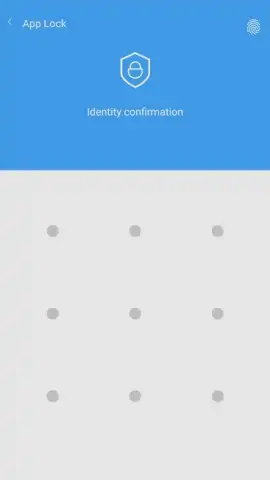
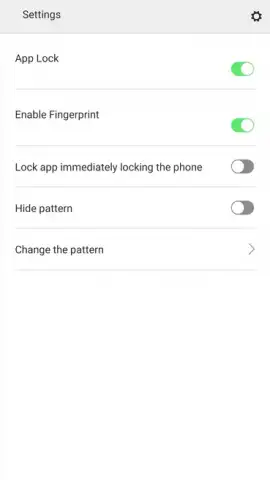
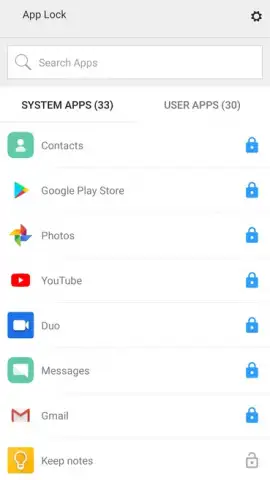
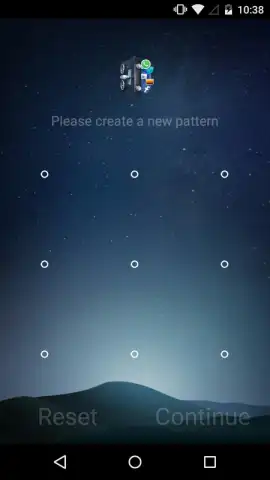
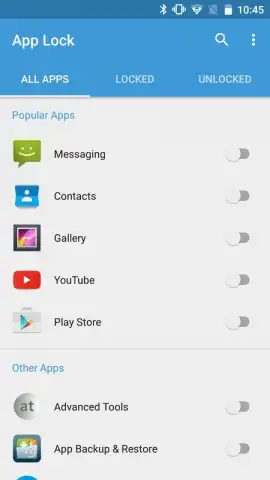
The core functionality of App Lock version 3.0.0 is straightforward: it applies a secondary authentication layer over any other installed application. Upon first launch, you configure a primary unlock method, choosing between a custom numeric PIN or a pattern grid. This credential then becomes the gatekeeper for any app you select. The process is deliberately uncomplicated. The main interface presents a clean, scrollable list of every application on your device. Protection is toggled with a single tap next to each app's name, moving it into a secured state. The subsequent experience is seamless; launching a locked app immediately triggers a full-screen overlay from KeepSafe, requiring your PIN or pattern before the original app's interface loads. A notable security feature is that the App Lock service itself is protected from unauthorized removal; any attempt to uninstall it first triggers the same authentication challenge, preventing easy circumvention.
The advertised "Turbo" mode appears to relate to performance optimization, ensuring the lock overlay engages quickly without causing noticeable lag for the protected applications. The absence of banner or video advertisements within the app's own menus, as noted in the source material, contributes to a clean and uninterrupted user experience, allowing the tool to function purely as a security utility rather than a platform for promotions.
Practical Application and Security Considerations
In practice, this creates distinct zones of privacy on your device. You can lock your messaging clients like WhatsApp or Telegram, your gallery and cloud storage apps, email clients, banking applications, and even settings panels containing sensitive configurations. It transforms a device from a monolithic, all-or-nothing access model into one with graduated permissions. While it does not encrypt the data within the apps—relying instead on access control—it serves as a powerful deterrent against casual snooping. It addresses the specific anxiety of loaning your device, ensuring that while someone may use it for an approved purpose, they cannot wander into your private messages or photo library. The protection is application-based, not content-based, meaning any file saved within a locked app's ecosystem is shielded.
- Selective Application Lockdown: Instantly protect any installed app, from social media and galleries to banking and email clients, with a secondary PIN or pattern.
- Intuitive Toggle-Based Management: A master list view allows you to secure or unsecure applications with a single tap, offering complete control over your privacy setup.
- Tamper-Resistant Uninstall Protection: The App Lock service safeguards itself; removal requires authentication, preventing others from simply deleting your security layer.
- Minimalist, Ad-Free Interface: The tool focuses on functionality with a clean design and no internal advertisements, promoting a seamless and focused user experience.
- Performance-Optimized Operation: Engineered to engage locks instantly without introducing lag or slowdown to your protected applications during daily use.
This tool is not a substitute for comprehensive device encryption or anti-malware suites, but as a dedicated access gatekeeper, it performs its singular task reliably. It adds a necessary, granular level of control that the standard Android permission system lacks, making privacy a per-application choice rather than a global setting.
Download App Lock by KeepSafe now and take immediate control over your on-device privacy! Don't wait for a breach of trust to happen—install this essential security layer today and lock down your personal apps in under a minute. Get it immediately!
Disclaimer: This application requires an internet connection for initial download and potential updates. The core locking functionality operates offline. It may contain in-app purchases for premium features. Please be aware that data usage and performance may vary based on your device specifications and Android OS version. This tool is intended for personal security enhancement and should be used in accordance with all applicable laws and terms of service of your protected applications.


