

Battery Calibration
Battery Calibration screenshots (2)
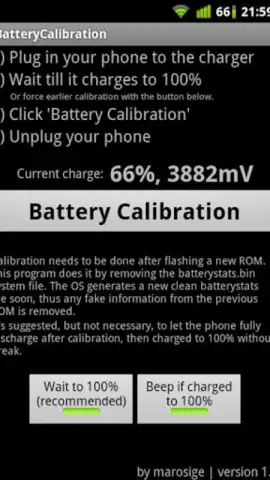

Description Battery Calibration
Addressing Inaccurate Battery Percentage Readings on Android
A common issue for Android users is a discrepancy between the displayed battery percentage and the actual remaining charge. This often stems from a miscalibrated battery system, where the device's software incorrectly interprets data from the battery hardware. The result is unpredictable shutdowns or a gauge that drains unevenly, reducing reliable usage time per charge. The Battery Calibration app by IMobS provides a technical procedure aimed at resetting this system data to restore accurate reporting.
This utility performs a specific file system operation to address calibration drift. It is important to understand that this is a corrective maintenance tool, not a performance enhancer. The core function involves accessing and deleting a specific system file, batterystats.bin, which stores historical battery usage statistics. Following this deletion, the Android operating system generates a new, clean version of the file. As the device is used and charged normally afterward, the system begins populating this fresh file with accurate, current data, which can lead to a more linear and truthful battery percentage display.
The application requires a device with root access to function, as the batterystats.bin file is located in a protected system directory. Without these elevated permissions, the app cannot perform its primary task. The process is straightforward within the app's interface, guiding the user through the necessary steps. It is critical to note that this tool does not improve physical battery health, increase capacity, or extend battery lifespan. Its sole purpose is to correct software-level reporting inaccuracies, allowing you to make informed decisions based on a more reliable charge indicator.
- System File Reset: Targets and removes the
batterystats.binfile to force the OS to create a new calibration baseline. - Root Access Requirement: Operates at a system level, necessitating a rooted Android device for full functionality.
- Diagnostic Accuracy Focus: Aims to synchronize software reporting with hardware state for truthful remaining charge data.
We suggest trying Battery Calibration if you are experiencing significant jumps in battery percentage or unexpected power-offs on a rooted Android device. Consider downloading it to execute this specific maintenance procedure.
A stable internet connection may be required for initial download. The application may offer in-app purchases for additional features or an ad-free experience.


