
Bluelight Filter for Eye Care
Bluelight Filter for Eye Care screenshots (4)
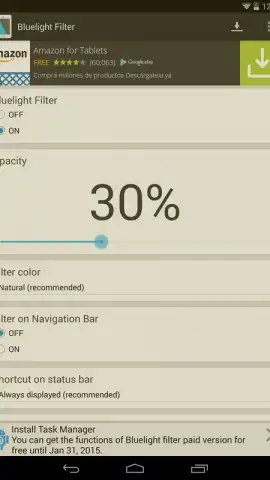
Description Bluelight Filter for Eye Care
A Practical Review of Bluelight Filter for Eye Care
After a long day of emails, social media, and late-night reading, the persistent glare of a smartphone screen can leave your eyes feeling strained and fatigued. This is a common modern discomfort, often attributed to high-energy blue light emissions. Bluelight Filter for Eye Care by Hardy-infinity addresses this directly, operating as a system-level overlay that applies a customizable tint to your Android display. Its primary function is not to add features, but to subtract a specific spectrum of light, aiming to reduce digital eye strain during prolonged use. The mechanics are straightforward, placing control over screen coloration and intensity directly in the user's hands with a focus on practical, daily relief.
Core Functionality and Customization
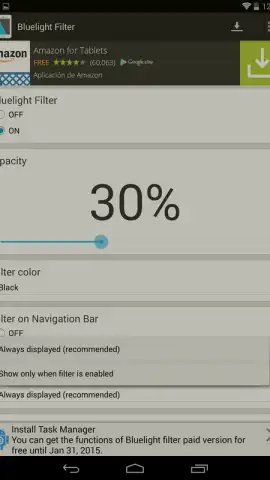
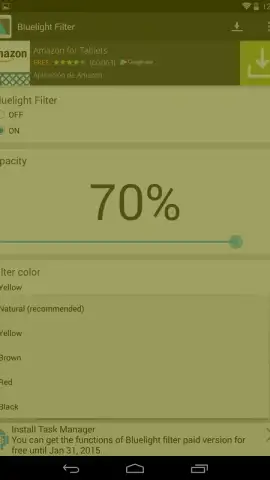
The application’s utility stems from its granular control over two key parameters: filter opacity and filter hue. The default setting initiates a 30% opacity filter, which introduces a mild, warm tint designed to take the harsh edge off screen brightness without drastically altering visual clarity. This baseline offers a gentle introduction for eyes needing respite. Users can increase this opacity significantly, which correspondingly reduces blue light intensity further but does demand an adjustment to a dimmer, warmer screen output. This trade-off between potential eye comfort and display vibrancy is central to the app's operation.
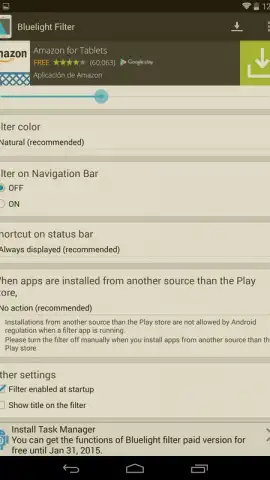
Beyond simple intensity, the tool provides a degree of color customization. While the default and most scientifically suggested filter is a warm amber/orange, the settings allow a shift to alternative tones like red or yellow. This can be useful for specific tasks or personal visual preferences. For seamless integration into daily use, the filter can be toggled directly from the notification shade for instant activation or deactivation. Furthermore, it supports automatic launch upon device boot, ensuring protection is consistently applied without requiring manual intervention each time.
- Adjustable Filter Intensity: Control opacity from a subtle 30% to a strong overlay, directly managing the blue light reduction level.
- Multi-Color Filter Options: Apply not just a standard amber tint but also switch to red or yellow filters for different visual tasks.
- Convenient Activation & Automation: Toggle the filter from the status bar and set it to auto-start with your device for always-on protection.
The app presents a focused solution for a specific problem. Its value is most apparent for individuals who spend extensive periods on their Android devices and experience symptoms of digital eye strain. By allowing systematic reduction of blue light and brightness, it creates a potentially less aggressive visual environment. For those seeking a no-frills, functional approach to eye comfort, this utility provides the essential controls without unnecessary complexity.
Download Bluelight Filter for Eye Care Now
Limited offer for new users: experience reduced eye strain today. Exclusive access to this essential tool is just one install away—get it before you scroll any further.
Disclaimer: This application requires an internet connection for initial download and may contain optional in-app purchases. Features are designed for Android devices and performance may vary.
 GooglePlay


