

FF Sensi
FF Sensi screenshots (3)

Description FF Sensi
A Tool for Competitive Free Fire Gameplay
For players of Free Fire, achieving consistent performance can be hindered by hardware limitations and imprecise control schemes. Input lag, unoptimised sensitivity settings, and a cluttered on-screen interface can create a barrier between player intent and in-game action. FF Sensi is a utility application designed to address these technical hurdles by providing a suite of configurable tools aimed at refining touchscreen controls and enhancing visual feedback for the mobile battle royale title.
Detailed Analysis of Core Functionalities
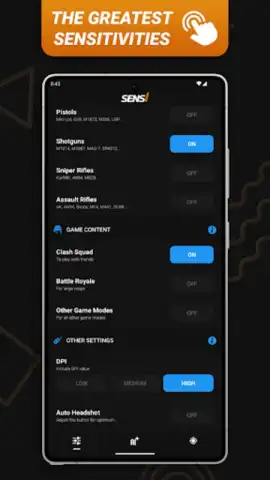
The primary utility of FF Sensi resides in its sensitivity calibration system. This tool functions as an intelligent sensitivity generator, which analyses your device's hardware profile and adapts in-game sensitivity parameters accordingly. This automated calibration seeks to eliminate the extensive trial-and-error process typically required to find optimal settings for aiming, scoping, and camera movement. A secondary control layer is introduced through a customisable trick-button feature. This allows for the remapping and repositioning of on-screen fire and action buttons, enabling a control layout that can facilitate faster reaction times and more ergonomic thumb placement during intense combat scenarios.
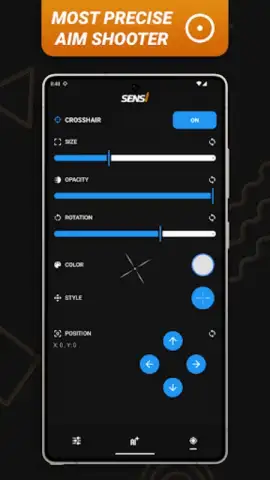
Further augmenting the targeting system is an integrated auto-crosshair tool. This feature overlays a persistent, customisable crosshair graphic onto the game screen. The purpose is to provide a fixed visual reference point for hip-fire accuracy, which can be particularly useful in close-quarters engagements where the default crosshair may disappear or become less distinct. To complement these control enhancements, the application includes a performance accelerator module. This background process is engineered to prioritise game resources, aiming to reduce frame rate stutters and minimise touch input latency. The objective is to maintain a more stable frames-per-second count during graphically demanding sequences like team fights or when navigating dense environments.
Key Feature Overview
- Intelligent sensitivity auto-calibration
- Customisable on-screen trick buttons
- Persistent auto-crosshair overlay
- Background performance acceleration
The configuration interface within FF Sensi is designed for granular adjustment, allowing users to fine-tune each tool to match their specific playstyle. The developer states that the utility operates without serving third-party advertisements during use. We suggest trying FF Sensi if you are seeking to methodically optimise the technical aspects of your Free Fire control scheme on a mobile device.
Consider downloading the FF Sensi APK to directly test these configuration tools within your gameplay environment.
Disclaimer: This utility requires an active internet connection for initial functionality checks and may operate alongside games featuring in-app purchases. It is intended for use with the official Free Fire client.
 GooglePlay


