

Game Screen Recorder
Game Screen Recorder screenshots (7)
Description Game Screen Recorder
Capture Every Gaming Moment in High Definition
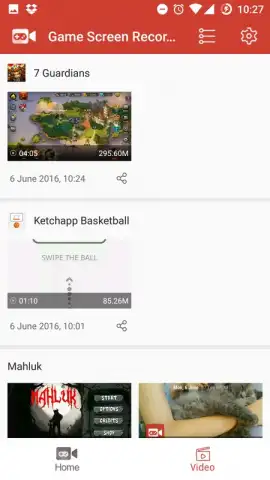
Stop letting your best gaming highlights fade into memory. Game Screen Recorder transforms your Android device into a powerful capture studio, designed specifically to record your gameplay with professional-grade clarity and control. It’s the essential tool for gamers who want to document epic wins, analyze their strategy, or share their skills with the world. Forget complex setups; this app delivers a streamlined, one-tap recording experience directly from your device's screen.
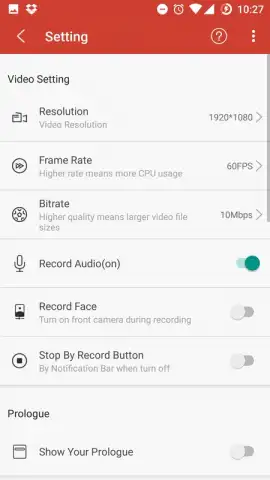
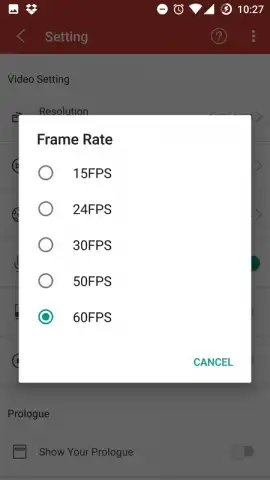
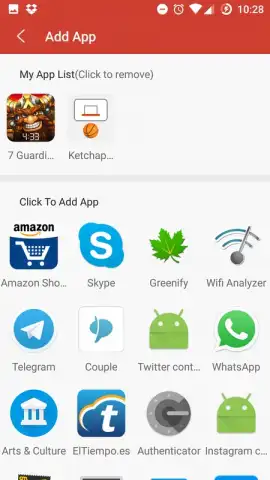
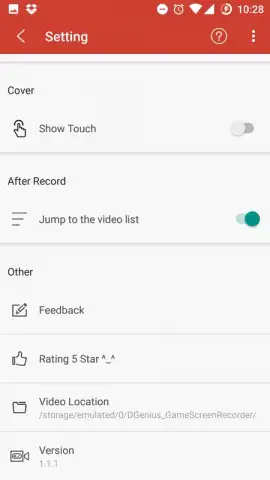
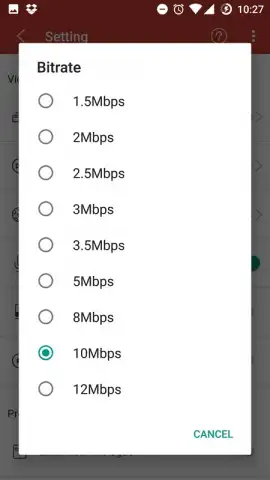
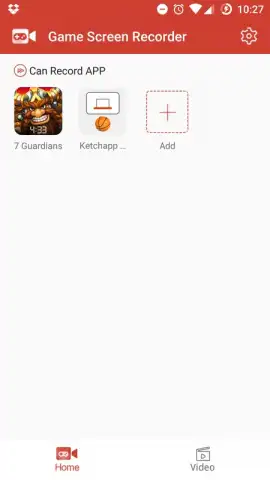
The application launches your chosen game from within its own interface, placing a dedicated REC button directly over your gameplay. A single tap initiates the capture process. You maintain full command with customizable settings that let you hide the control button during recording for an unobstructed view or keep it visible for quick access. The technical controls are comprehensive: you can manually adjust the video quality, select specific resolutions, define the frames per second for smooth playback, and set the bitrate for optimal file size and clarity. Furthermore, the app supports layered audio recording, allowing you to capture your live commentary via the device microphone and simultaneously record a picture-in-picture video feed from your front-facing camera to add a personal reaction cam.
- One-tap recording from app launcher
- Fully customizable video quality settings
- Microphone and front-camera audio/video support
- Persistent or hideable on-screen controls
We suggest trying Game Screen Recorder to build a library of your finest gaming achievements. Consider downloading it today to start creating high-quality, shareable content from your mobile gameplay sessions.
Heads up: you'll need wifi for most features. Some cool stuff is extra. Internal device audio is not captured by the recording system.


