

Halo Browser
Halo Browser screenshots (10)








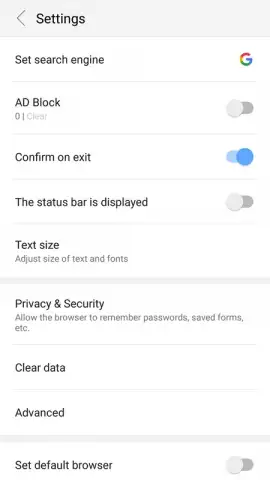

Description Halo Browser
Navigating the Web Efficiently Without Intrusive Distractions
The modern web browsing experience is often defined by a trade-off: access to content in exchange for exposure to intrusive advertising and the loading of heavy media elements, which can slow down page speeds and consume significant data. Halo Browser, developed by Fantastic Tools & Emoji ke, presents itself as a utility-focused alternative within the social category, designed to address these specific friction points. Its core proposition is not a suite of novel social features, but rather a streamlined, performance-oriented approach to accessing websites. The application positions itself as a tool for users whose primary requirement is direct, uncluttered access to web pages, with granular control over what elements are loaded during a browsing session.
Core Functionality and Performance Controls
Halo Browser operates on a foundation of standard browsing mechanics, providing essential tools such as a private Incognito mode, a bookmarking system for saving favorite sites, and a comprehensive history log. These features ensure parity with basic expectations for any modern browser. Where the application differentiates itself is through its immediate and prominent focus on content filtering. Upon launch, the interface presents a clear option to activate its built-in ad filter. This system is designed to intercept and block advertising content across visited web pages, aiming to reduce visual clutter and potential security risks from third-party ad networks.
A more distinctive control is the user's ability to disable the loading of images entirely. This function directly targets page load performance and data usage. When toggled, websites render text and structural elements without graphics, which can drastically accelerate loading times on slower connections and reduce cellular data consumption. These two primary controls—the ad filter and the image loader—are presented as easily accessible toggles, allowing users to modify their browsing environment in a few clicks based on their immediate needs, whether for speed, data preservation, or a cleaner reading experience.
The application references a "Turbo" mode, which appears to be an overarching term for the performance benefits gained from employing these filtering tools in tandem. The claimed advantages are a browsing session free from advertising interruptions and enhanced page load speeds. The interface is designed to be intuitive, presenting these core tools upfront rather than burying them in complex settings menus.
- Integrated Ad-Blocking Filter: Activates upon launch to remove banner, pop-up, and inline advertisements from website content.
- Configurable Image Loading: A toggle to disable all images, significantly boosting page load speeds and reducing data usage.
- Standard Private Browsing Mode: Incognito tab functionality that does not save history or cookies after the session ends.
- Essential Navigation Tools: Includes bookmark management and a full history viewer for organizing and revisiting sites.
- Streamlined User Interface: Presents core controls prominently for quick adjustment of browsing preferences and performance.
For users frequently hindered by slow-loading pages or those seeking a more minimal, text-focused web experience, Halo Browser provides a straightforward set of tools. It is a viable option for replacing a default browser when the priority is functional control over advertising and media content.
Consider downloading Halo Browser for a more controlled browsing experience.
Download mobile app now
Disclaimer: This application requires an active internet connection. The performance of the ad-blocking feature may vary depending on website construction. The developer, Fantastic Tools & Emoji ke, may offer in-app purchases. Users should review the app's listing for age ratings and data privacy details before installation.


