

LiveBoot
LiveBoot screenshots (6)
Description LiveBoot
Want to See the Inner Workings of Your Android Boot Process?
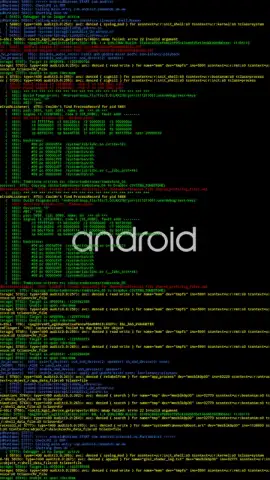
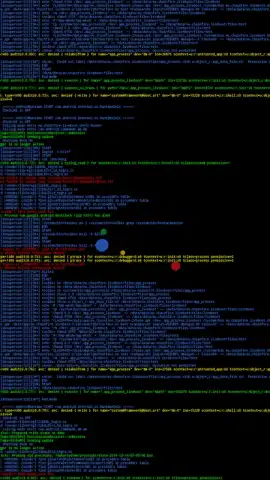
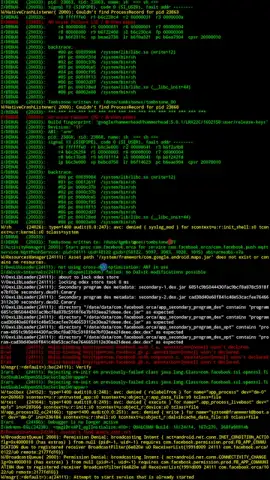
LiveBoot transforms the standard boot animation on rooted Android devices into a dynamic, real-time display of system logs. Instead of a static logo, your screen shows the live output from logcat and dmesg, providing a technical visualization of the startup sequence. This tool is designed for users who require visibility into the low-level operations of their device from the very first moment it powers on.
Core Functionality and Configuration
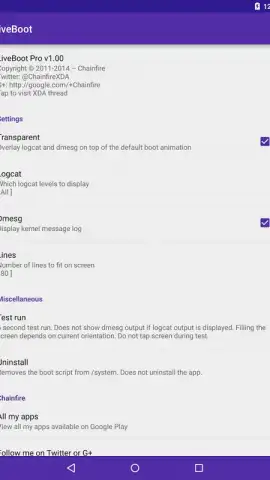
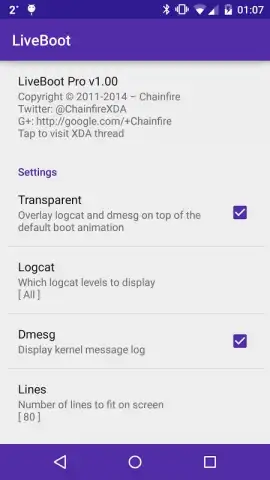
The application mounts after the data partition is mounted during boot. For devices requiring a decryption key or pattern at startup, the LiveBoot animation will commence only after this step is completed. The primary function revolves around capturing and displaying system log data, which can be extensively configured. You can select the specific logcat level, buffer, and output format, and choose to show or hide dmesg output independently. The on-screen display is highly customizable, allowing you to set the exact number of text lines shown and enable or disable word wrapping. For improved log analysis, the output supports color-coding, which helps in quickly distinguishing between different types of log entries. An optional transparent overlay can be applied to the animation, enhancing the visual presentation beyond a traditional boot screen.
A dedicated test mode lets you preview your configuration without rebooting your device. It is important to note that the lines shown in this test mode may be limited and static compared to the live, streaming data seen during an actual boot sequence. This allows for safe experimentation before applying settings permanently.
Advanced Features and System Requirements
Unlocking the Pro version of LiveBoot grants access to advanced functionality. This includes finer-grained transparency controls and additional, more specialized logcat filters. Pro mode can be activated via an in-app purchase or is automatically granted to users of certain legacy paid versions. A significant Pro feature is the custom script function. This allows you to execute user-defined shell scripts during the boot process instead of, or alongside, the standard logcat/dmesg methods. The output from these custom scripts is displayed in distinct white and red colors for clear differentiation from system logs.
LiveBoot has specific technical requirements. It necessitates root access, specifically via SuperSU version 2.40 or newer, or the latest version of Magisk. Official compatibility is stated for Android 5.0 (Lollipop) and newer. However, compatibility can vary across different devices and custom firmware. Devices with firmware that support init.d scripts may see varied results, though official support for these ROMs is not guaranteed. Firmware updates can affect LiveBoot's operation. While the risk of a boot loop is considered low, it is a potential issue. Troubleshooting typically involves removing the LiveBoot APK or specific system files via a custom recovery mode if the device fails to boot correctly.
- Dynamic boot log display
- Deep logcat & dmesg configuration
- Custom scripts for advanced users
Download LiveBoot Now: Exclusive Early Access for Root Users
Gain unparalleled insight into your device's startup. This is a limited-time offer for enthusiasts who want to replace the generic boot animation with a powerful diagnostic and customization tool. Install LiveBoot today and transform your boot sequence.
Disclaimer: This application requires a rooted Android device (Android 5.0+). Root access (SuperSU 2.40+ or Magisk) is mandatory for functionality. Operation is not guaranteed on all devices or custom firmware. A stable internet connection may be required for initial setup and Pro unlock. The app contains in-app purchases to unlock the Pro version. Use may involve accessing system-level data. There is a non-zero risk of boot complications; ensure you have recovery mode access for troubleshooting. By installing, you acknowledge these risks. Data usage is minimal and primarily for license verification.
 GooglePlay


