

Mailbox
Mailbox screenshots (4)


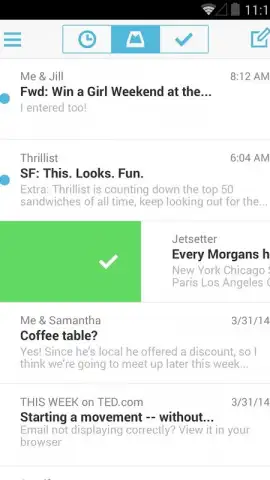

Description Mailbox
Your Inbox, Finally Under Control
Tired of your email app feeling like a cluttered desk? What if you could clear your entire inbox with just a few swipes? Mailbox transforms your email from a source of stress into a streamlined workflow, putting you back in command with an interface so intuitive it feels like second nature. This isn't just another email client; it's a complete rethinking of how you interact with your messages, designed to give you that satisfying feeling of reaching "inbox zero" every single day.
Experience Effortless Email Management
The core philosophy of Mailbox is simplicity through gesture-based control. Instead of tapping through menus, you manage your entire inbox with natural swipes. A quick swipe to the right instantly archives a message, clearing it from your immediate view. A longer, more deliberate swipe all the way across the screen sends a message straight to the trash, perfect for that spam or an old newsletter. Swiping left opens a world of options, letting you quickly snooze an email to return later or move it directly into a specific folder like drafts. This gesture-first approach means you can process dozens of emails in minutes, not hours.
The app presents a clean, minimalist interface that focuses entirely on your content, eliminating visual clutter. If you're coming from a service like Gmail, the initial experience is refreshingly direct, stripping away complexity to highlight efficiency. Beyond the sleek design, features like Turbo mode accelerate your experience, ensuring smooth performance. You'll find yourself reading, composing, and organizing messages with a fluidity that makes traditional email apps feel outdated.
Key Features at a Glance
- Archive messages instantly with a simple, short swipe to the right.
- Delete emails decisively with a long, full-length swipe across the screen.
- Snooze or file messages using a quick left-swipe gesture for later review.
- Navigate a beautifully minimalist and ad-free interface designed for focus.
- Enjoy enhanced performance and speed with the optional Turbo mode.
Consider downloading Mailbox now to experience the fastest way to clear your inbox. This is the tool that turns email management from a chore into a quick, daily victory.
Download the Mailbox mobile app now.
Heads up: you'll need wifi for most features. Some cool stuff is extra.


