

MAX Security (Virus Cleaner and Antivirus)
MAX Security (Virus Cleaner and Antivirus) screenshots (9)








Description MAX Security (Virus Cleaner and Antivirus)
Imagine this: you unbox your Android phone, and it’s lightning fast. Months later, you notice the dreaded lag—apps stutter, storage mysteriously fills, and battery life dwindles. This gradual slowdown isn't just an annoyance; it's often the symptom of accumulated digital clutter, hidden cache files, and the lurking possibility of malware. Restoring that original performance requires a systematic, professional-grade tool. MAX Security (Virus Cleaner and Antivirus) positions itself as that comprehensive utility, designed not merely as a scanner but as a full-system optimization suite for the discerning user who values both security and speed.
Core Functionality and Interface Design
The application distinguishes itself immediately through a logically structured, clean interface that prioritizes user action over decorative elements. Upon launch, the central dashboard presents clear, large tiles for primary functions: Device Scan, Memory Boost, CPU Cooler, and Privacy Cleaner. This layout eliminates the friction commonly found in utility apps, allowing immediate access to deep system analysis. The initial full-device scan is methodical, checking installed applications, system files, and runtime processes for signatures of malware, adware, and potentially unwanted programs (PUPs). The post-scan report is detailed yet intelligible, categorizing threats by severity and providing clear action buttons for remediation, which demystifies the cleaning process for non-technical users.
Beyond Antivirus: A Multi-Tool for System Health
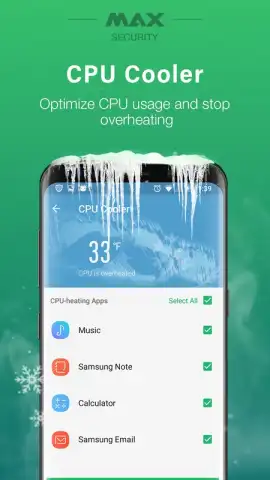
MAX Security operates on the principle that security and performance are intrinsically linked. After the foundational security scan, its toolset expands to address the hardware-level factors that degrade user experience. The Memory Boost function aggressively clears redundant background processes and cached data from RAM, freeing up resources for active applications. The CPU Cooler module monitors running apps for abnormal processor load, identifying and allowing the user to terminate resource-hungry tasks that cause overheating and throttle performance. Concurrently, the Battery Saver feature analyzes power-drain patterns and suggests system setting adjustments to extend battery life. A dedicated Privacy Cleaner tab offers granular control, enabling the secure deletion of call logs, SMS history, browser cache, and residual files from uninstalled apps, thereby reclaiming storage space and reducing digital footprints.
Detailed Feature Breakdown
The utility of MAX Security is best understood through its discrete, actionable features:
- Comprehensive Malware Scan: Conducts deep, signature-based and heuristic analysis of all file directories and installed apps to identify viruses, spyware, and trojans.
- Real-Time Performance Optimization: Clears junk files, cache residuals, and unnecessary background processes to instantly free up RAM and internal storage space.
- Hardware Management Suite: Actively monitors and manages CPU temperature and battery consumption to prevent thermal throttling and extend battery cycle life.
- Privacy and File Sanitization: Provides tools to permanently erase sensitive browsing data, app histories, and personal files to protect user confidentiality and organize storage.
Download MAX Security (Virus Cleaner and Antivirus) now! Do not tolerate a slow, vulnerable device for another day—install this essential toolkit immediately and take full command of your Android's performance and security.
Get it immediately!
Disclaimer: This application requires an active internet connection for virus definition updates and certain cloud-based features. It may offer in-app purchases for premium functionality. Use is subject to the developer's Terms of Service. Data usage applies during scans and updates. This tool is intended for users aged 13 and over. Always maintain a backup of critical personal data.


