

Media Player Classic Remote
Media Player Classic Remote screenshots (1)
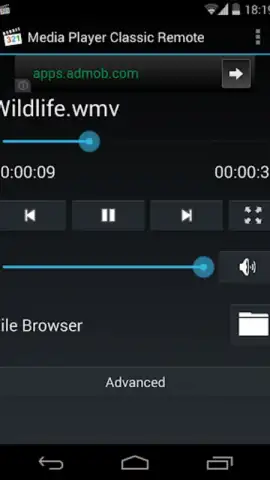
Description Media Player Classic Remote
Imagine your favorite movie is playing on your computer across the room. The scene is perfect, but the volume is too low. Instead of breaking your immersion by getting up, you simply reach for your phone. This is the precise utility of Media Player Classic Remote, transforming your Android device into a sophisticated, wireless command center for the venerable Media Player Classic – Home Cinema (MPC-HC) on your Windows PC.
Core Functionality & Control Scheme
The application establishes a seamless Wi-Fi connection with MPC-HC, replicating the core interface of the desktop player on your mobile screen. This is not a simple remote with basic play/pause buttons; it is a full-featured transport control. You can browse your entire media library directly from your phone, selecting files to play on the PC without touching the keyboard. Playback controls are comprehensive, including frame-accurate seeking, adjustable playback speed, and direct chapter navigation. Crucially, it provides dedicated audio and subtitle track selection, allowing you to switch languages or enable secondary audio streams with a single tap, which is particularly valuable for watching foreign films or content with commentary.
Key Advantages & User Experience
The primary advantage is the preservation of a cinematic or focused viewing experience. By eliminating the need for physical proximity to the PC, the app reduces distractions and maintains the intended atmosphere. The interface is designed for clarity and responsiveness, presenting essential information like current timecode, file title, and active tracks without clutter. Performance is focused on low-latency communication, ensuring that commands like volume adjustment or scene skipping feel instantaneous. The visual design is clean and functional, prioritizing readability in a dark room setting, which aligns perfectly with its use case.
- Complete Library Browsing: Navigate and launch any video or audio file from your PC's directories directly on your phone.
- Precision Playback Control: Utilize frame-step, variable speed playback, and chapter jumps for detailed media analysis.
- Dynamic Stream Management: Instantly switch between multiple audio tracks and subtitle files during playback without menus.
Stop interrupting your movies. Download Media Player Classic Remote now and take definitive control of your media center from the comfort of your couch. Get it immediately!
Internet required. IAP available.


