Microsoft Teams

Microsoft Teams

4.8 81 ratings
92 Views
205.12 MB Size
3+ Age

Microsoft Teams screenshots (20)

Microsoft Teams скриншот 1
Microsoft Teams скриншот 2
Microsoft Teams скриншот 3
Microsoft Teams скриншот 4
Microsoft Teams скриншот 5
Microsoft Teams скриншот 6
Microsoft Teams скриншот 7
Microsoft Teams скриншот 8
Microsoft Teams скриншот 9
Microsoft Teams скриншот 10
Microsoft Teams скриншот 11
Microsoft Teams скриншот 12
Microsoft Teams скриншот 13
Microsoft Teams скриншот 14
Microsoft Teams скриншот 15
Microsoft Teams скриншот 16
Microsoft Teams скриншот 17
Microsoft Teams скриншот 18
Microsoft Teams скриншот 19
Microsoft Teams скриншот 20

Description Microsoft Teams

Microsoft Teams Review: The Definitive Hub for Modern Collaboration

Microsoft Teams has evolved far beyond a simple messaging app to become the central nervous system for professional and educational collaboration in a distributed world. This analysis examines the application not as a promotional tool, but as a comprehensive platform that integrates communication, file management, and project coordination into a single, encrypted environment. Its core value lies in its deep synergy with the Microsoft 365 ecosystem, creating a seamless workflow that is difficult to replicate with disparate tools.

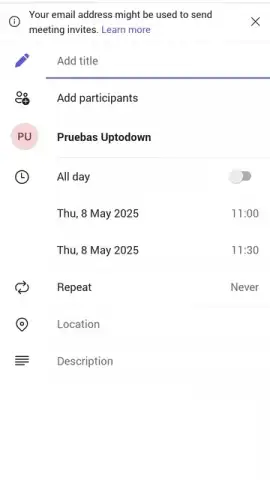
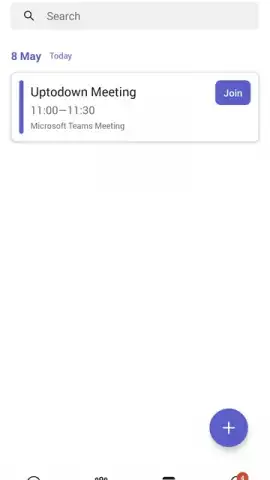
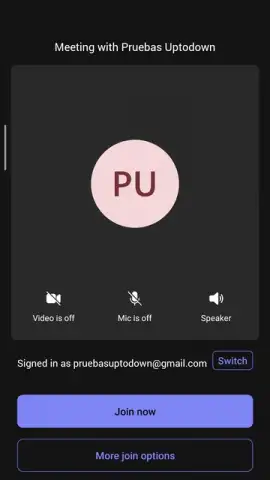
The application’s communication suite is multi-modal and designed for clarity and record-keeping. Users initiate interactions through persistent chat channels, direct instant messaging with support for files and GIFs, or escalate to voice and video calls with a single click. The meeting functionality is particularly robust, supporting hundreds of simultaneous participants with individual video feeds, live captions, and automated recording. Every meeting is not only archived but also transcribed, allowing team members to search the textual content of discussions without rewatching hours of footage. For presentations, the screen sharing feature is granular, permitting the display of a specific window, a desktop, or a digital whiteboard that participants can annotate in real-time, effectively replicating an in-person brainstorming session.

Security and integration form the bedrock of the platform. All data, whether in transit or at rest, is protected with enterprise-grade, end-to-end encryption, adhering to major compliance standards. This secure layer extends to file collaboration, where documents from Word, Excel, and PowerPoint can be co-authored in real-time within the Teams interface, with changes saved directly to integrated cloud storage like OneDrive or SharePoint. The platform’s extensibility is a critical feature, allowing administrators to connect third-party educational tools such as Moodle or Flip, and to automate workflows with Power Platform integrations, turning Teams into a customizable command center.

While its enterprise pedigree is strong, Microsoft Teams has significant utility in academic and personal contexts. Educational institutions leverage its large-meeting capacity and document collaboration for remote lectures and group projects. For individual users, it serves as a secure, ad-free platform for connecting with family or community groups, offering a more structured alternative to consumer messaging apps. The requirement for a Microsoft account (corporate, school, or personal) gates access, ensuring that every interaction is tied to a verified identity within a controlled tenant environment.

  • Unified Communication Hub: Conduct instant messaging, multi-participant voice calls, and high-definition video conferences within a single, fluid interface.
  • Live Meeting Transcription & Recording: Automatically records and generates a searchable text transcript for every meeting for asynchronous review.
  • Real-Time Document Co-Authoring: Seamlessly edit Word, Excel, and PowerPoint files collaboratively without leaving the Teams application.
  • Enterprise-Grade Security Protocols: Features end-to-end encryption for all chats and files, ensuring compliance with strict data protection regulations.
  • Extensible Platform with Deep Integration: Connects natively with Microsoft 365 apps and supports third-party integrations for education and workflow automation.

Download Microsoft Teams now to transform your collaborative workflow. Exclusive, full-featured access is available for a limited time to new users deploying it within their organization.

Internet required. IAP available.

Manually checked and VirusTotal

Latest version

Version
1416/1.0.0.2026051303
Date
17.03.2026
Signature
03aef1b47a462db1501f2ab11b6843b0
Architecture
arm64-v8a
GooglePlay GooglePlay

About this app

Package name
com.microsoft.teams
Min. Android
Android + 9
Age
3+

Version history Microsoft Teams

Microsoft Teams 1416/1.0.0.2026051303
17.03.2026
205.12 MB
Microsoft Teams 1416/1.0.0.2026043102
17.03.2026
180.14 MB
Microsoft Teams 1416/1.0.0.2026042203
17.03.2026
204.1 MB
Microsoft Teams 1416/1.0.0.2026041303
17.03.2026
204.1 MB
Microsoft Teams 1416/1.0.0.2026033106
17.03.2026
179.49 MB
Microsoft Teams 1416/1.0.0.2026031303
17.03.2026
203.46 MB
Microsoft Teams 1416/1.0.0.2026023402
17.03.2026
202.39 MB
Microsoft Teams 1416/1.0.0.2026023104
17.03.2026
202.39 MB
Microsoft Teams 1416/1.0.0.2026015202
17.03.2026
200.81 MB
Microsoft Teams 1416/1.0.0.2026015002
17.03.2026
176.92 MB
Microsoft Teams 1416/1.0.0.2026013703
17.03.2026
200.81 MB
Microsoft Teams 1416/1.0.0.2025235602
17.03.2026
196.75 MB
Microsoft Teams 1416/1.0.0.2025234302
17.03.2026
196.75 MB
Microsoft Teams 1416/1.0.0.2025232403
17.03.2026
196.73 MB
Microsoft Teams 1416/1.0.0.2025225102
17.03.2026
196.62 MB
Microsoft Teams 1416/1.0.0.2025224506
17.03.2026
391.3 MB
Microsoft Teams 1416/1.0.0.2025224102
17.03.2026
196.61 MB
Microsoft Teams 1416/1.0.0.2025223102
17.03.2026
172.87 MB
Microsoft Teams 1416/1.0.0.2025222003
17.03.2026
196.61 MB
Microsoft Teams 1416/1.0.0.2025211603
17.03.2026
171.94 MB
Microsoft Teams 1416/1.0.0.2025204802
17.03.2026
195.4 MB
Microsoft Teams 1416/1.0.0.2025203902
17.03.2026
195.4 MB
Microsoft Teams 1416/1.0.0.2025203702
17.03.2026
195.4 MB
Microsoft Teams 1416/1.0.0.2025203104
17.03.2026
195.4 MB
Microsoft Teams 1416/1.0.0.2025202306
17.03.2026
195.39 MB
Microsoft Teams 1416/1.0.0.2025201103
17.03.2026
195.39 MB
Microsoft Teams 1416/1.0.0.2025193702
17.03.2026
389.52 MB
Microsoft Teams 1416/1.0.0.2025193002
17.03.2026
194.82 MB
Microsoft Teams 1416/1.0.0.2025192203
17.03.2026
194.8 MB
Microsoft Teams 1416/1.0.0.2025183402
17.03.2026
190.58 MB
Microsoft Teams 1416/1.0.0.2025182902
17.03.2026
190.58 MB
Microsoft Teams 1416/1.0.0.2025182503
17.03.2026
190.61 MB
Microsoft Teams 1416/1.0.0.2025174002
17.03.2026
191.65 MB
Microsoft Teams 1416/1.0.0.2025173104
17.03.2026
191.65 MB
Microsoft Teams 1416/1.0.0.2025172702
17.03.2026
191.65 MB
Microsoft Teams 1416/1.0.0.2025172203
17.03.2026
191.65 MB
Microsoft Teams 1416/1.0.0.2025171603
17.03.2026
191.66 MB
Microsoft Teams 1416/1.0.0.2025162702
17.03.2026
190.23 MB
Microsoft Teams 1416/1.0.0.2025162003
17.03.2026
190.26 MB
Microsoft Teams 1416/1.0.0.2025161303
17.03.2026
190.26 MB
Microsoft Teams 1416/1.0.0.2025153104
17.03.2026
189.18 MB
Microsoft Teams 1416/1.0.0.2025152702
17.03.2026
189.18 MB
Microsoft Teams 1416/1.0.0.2025151305
17.03.2026
189.18 MB
Microsoft Teams 1416/1.0.0.2025143402
17.03.2026
188.5 MB
Microsoft Teams 1416/1.0.0.2025142502
17.03.2026
188.5 MB
Microsoft Teams 1416/1.0.0.2025141803
17.03.2026
188.48 MB
Microsoft Teams 1416/1.0.0.2025141503
17.03.2026
188.84 MB
Microsoft Teams 1416/1.0.0.2025134102
17.03.2026
378.69 MB
Microsoft Teams 1416/1.0.0.2025132902
17.03.2026
187.48 MB
Microsoft Teams 1416/1.0.0.2025132305
17.03.2026
187.48 MB
Microsoft Teams 1416/1.0.0.2025132003
17.03.2026
164.78 MB
Microsoft Teams 1416/1.0.0.2025123003
17.03.2026
186.23 MB
Microsoft Teams 1416/1.0.0.2025123002
17.03.2026
186.23 MB
Microsoft Teams 1416/1.0.0.2025122102
17.03.2026
186.23 MB
Microsoft Teams 1416/1.0.0.2025121405
17.03.2026
186.27 MB
Microsoft Teams 1416/1.0.0.2025112902
17.03.2026
186.24 MB
Microsoft Teams 1416/1.0.0.2025112002
17.03.2026
186.24 MB
Microsoft Teams 1416/1.0.0.2025111303
17.03.2026
186.22 MB
Microsoft Teams 1416/1.0.0.2025102802
17.03.2026
180.39 MB
Microsoft Teams 1416/1.0.0.2025102104
17.03.2026
180.39 MB
Microsoft Teams 1416/1.0.0.2025101303
17.03.2026
180.34 MB
Microsoft Teams 1416/1.0.0.2025093002
17.03.2026
178.3 MB
Microsoft Teams 1416/1.0.0.2025092504
17.03.2026
178.3 MB
Microsoft Teams 1416/1.0.0.2025091303
17.03.2026
178.29 MB
Microsoft Teams 1416/1.0.0.2025082802
17.03.2026
153.87 MB
Microsoft Teams 1416/1.0.0.2025082703
17.03.2026
159.28 MB
Microsoft Teams 1416/1.0.0.2025073902
17.03.2026
176.12 MB
Microsoft Teams 1416/1.0.0.2025063004
17.03.2026
362.1 MB
Microsoft Teams 1416/1.0.0.2025022204
17.03.2026
358.87 MB

Ratings and reviews for Microsoft Teams

4.8
81 ratings

Leave a review

5 + 10 =
Manually checked and VirusTotal
Latest version
Version
1416/1.0.0.2026051303
Date
17.03.2026
Signature
03aef1b47a462db1501f2ab11b6843b0
Architecture
arm64-v8a
GooglePlay GooglePlay
About this app
Package name
com.microsoft.teams
Min. Android
Android + 9
Age
3+