

Mopria Print Service
Mopria Print Service screenshots (2)
Description Mopria Print Service
The Universal Printing Solution for Android Is Already on Your Device
Mopria Print Service represents a fundamental shift in how Android users approach printing, moving it from a fragmented, driver-dependent chore to a seamless, system-level utility. Its core function is deceptively simple: to provide a universal, ad-free printing protocol that works natively with thousands of printer models without requiring brand-specific apps. This isn't just another print helper; it's the standardized backbone adopted by major manufacturers like Epson, Canon, Brother, and Xerox, effectively making their printers first-class citizens on your Android device. The experience is characterized by a notable absence of friction—no lengthy setup wizards, no intrusive advertisements, and no need to hunt for compatible software for each new printer you encounter.
Operational Mechanics and Workflow Integration
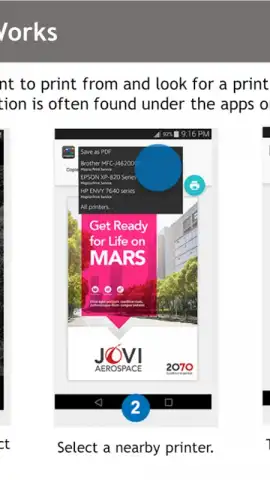
The technical operation of Mopria is where its value becomes fully apparent. Once installed and granted necessary permissions, it integrates directly into the standard Android 'Share' and 'Print' menus. The actual printing process follows a logical, two-step sequence: first, you initiate a print job from any application as you normally would, then you select your target printer from a dynamically populated list of available devices on the local network. The service handles the communication protocol translation in the background, supporting a wide range of file formats from documents and PDFs to web pages and photographs. An often-overlooked but critical feature is its role as a print conduit for cloud and sharing workflows; you can send a file to the service via email or any messaging app, and Mopria will hold it in a queue, ready for output on the next available compatible printer, streamlining collaboration.
Analysis of Key Advantages and Practical Considerations
From an analytical standpoint, Mopria's primary advantage is ecosystem consolidation. It eliminates the digital clutter of maintaining multiple, often poorly optimized, OEM printing applications. The performance is consistently reliable, with job processing and spooling occurring in seconds, assuming a stable Wi-Fi connection between your device and the printer. It's important to understand that Mopria functions as a service, not a standalone app with a daily interface; its presence is felt only when needed. While it covers the vast majority of modern network and Wi-Fi Direct printers, extremely old or proprietary models may still require their original software. The absence of any advertising or subscription fees for core functionality is a significant point in its favor, offering a clean, purpose-driven utility.
- Universal driver for major brands
- Integrated into Android system menus
- Supports documents, photos, and web pages
- Ad-free and no-cost core service
Download Mopria Print Service immediately and transform every networked printer into a one-tap resource from your Android device!
Heads up: you'll need wifi for most features. Some cool stuff is extra.
 GooglePlay


