

MusicFX
MusicFX screenshots (2)
Description MusicFX
A Practical Examination of Audio Enhancement on Android
For users of Android devices, particularly those running older versions of the operating system, achieving high-fidelity audio playback has often been a technical challenge reliant on hardware capabilities. The MusicFX application by NXP Software B.V. presents itself as a software-based solution designed to augment the built-in audio processing. This review analyzes its functionality as a system-level sound effects service that integrates directly with the Android audio framework, bypassing the need for a standalone media player.
Core Audio Processing Features and System Integration
The primary operational mechanism of MusicFX is its activation as the default sound effects processor within the Android OS. Upon installation and configuration, its controls become accessible through the 'Sound Effects' or 'Music Effects' menu in compatible media players, including the standard Android music application. This deep system integration is a defining characteristic, allowing its processing to be applied globally to audio output from various sources, provided they adhere to the Android sound effects API. The application's toolkit is centered on several discrete audio DSP (Digital Signal Processing) effects.
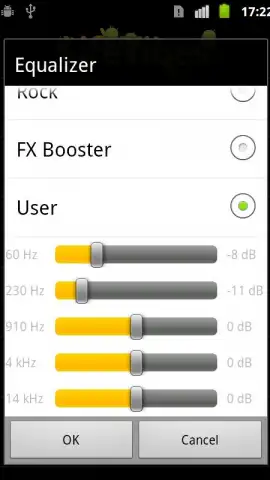
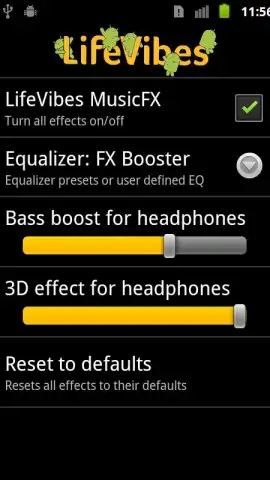
A headphone virtualization feature aims to create a simulated three-dimensional soundscape through stereo widening and reverb algorithms, intended to add spatial depth to audio played through standard headphones. Separately, a bass boost function applies gain to low-frequency ranges, which can be particularly noticeable in genres like electronic or hip-hop. For precise tonal adjustment, the app provides a five-band equalizer with adjustable center frequencies and gain levels, alongside a set of genre-specific presets such as Classical, Dance, Rock, and Pop. These presets are essentially predefined EQ curves tailored to common listening profiles.
Detailed Feature Breakdown
- System-Wide Audio Integration: Functions as the default Android sound effects service, making enhancements available within the native music player and other compatible media applications without requiring a dedicated UI.
- Immersive 3D Headphone Virtualization: Employs stereo expansion and reverb effects to simulate a wider, more enveloping audio environment specifically for headphone listening, adding perceived spatial dimension.
- Customizable Five-Band Equalizer: Offers manual control over specific frequency ranges (typically 60Hz, 230Hz, 910Hz, 4kHz, 14kHz) for detailed sound shaping, supplemented by one-touch genre presets for immediate optimization.
It is important to note for advanced functionality, such as applying specific enhancements to Bluetooth audio outputs, the application may require permissions to access and modify Bluetooth settings. Furthermore, the software utilizes an internet connection primarily to fetch updated help documentation and informational pages from the developer, not for audio processing itself. Compatibility is stated for devices running Android 2.3 (Gingerbread) and later, positioning it as a viable option for enhancing audio on a wide range of legacy and modern hardware.
Download the MusicFX mobile app now and configure it as your default sound effects service to immediately audit its impact on your device's audio output.
Disclaimer: This application requires an internet connection for fetching help content. It integrates deeply with Android system settings and may require specific permissions for full functionality, such as Bluetooth setup access. Use is subject to your device's compatibility and operating system version. Data usage is minimal and related to documentation updates only. There are no in-app purchases mentioned in the current version.


