

Muvi Downloader
Muvi Downloader screenshots (7)



Description Muvi Downloader
A Straightforward Tool for Direct Media Acquisition
For users seeking a no-frills method to obtain video and audio files from online platforms, Muvi Downloader presents a focused utility. This application streamlines the process of saving content for offline access, operating with a singular purpose that eliminates procedural complexity. Its design prioritizes function over form, translating to a workflow that is both rapid and repeatable once understood. The core value proposition is clear: converting a streaming URL into a local file stored on your Android device within a few actions.
Operational Mechanics and Interface Design
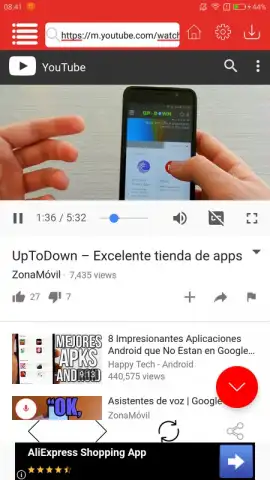
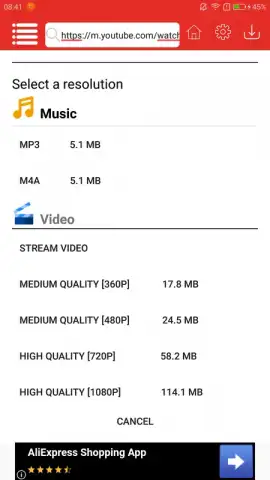
The application environment is essentially a dedicated browser window linked to a download manager. Upon launch, you are presented with a familiar web interface to locate your desired video. The download initiation process is manual but uncluttered; after selecting a video, you tap a download indicator to reveal available format options. The system provides a practical choice between audio extraction—saved as MP3 or M4A files—and full video download in resolutions typically labeled as high or medium quality. A critical detail is the display of estimated file size for each format, allowing for informed decisions based on your device's storage capacity. The absence of in-stream advertising within the core download workflow is a noted operational advantage, preventing interruptions during the file acquisition process.
Analytical Feature Breakdown
The functionality of Muvi Downloader can be distilled into several key operational components.
- Direct integration with a web browser for seamless video search and discovery.
- Dual-format download options for audio-only (MP3/M4A) or complete video files.
- Selectable video quality settings to balance visual fidelity and file size.
- Pre-download file size estimation for efficient storage management.
- Offline playback capability for all downloaded media files without an internet connection.
Practical Usage and Considerations
In practice, the tool requires a stable internet connection for both the search and download phases. The conversion and saving process is handled locally on the device. It is important for users to be mindful of the copyright policies associated with the content they choose to download. For personal, offline viewing of publicly available videos, this app serves as a competent technical solution. The interface, while minimal, provides all necessary controls without superfluous features that could complicate the task.
We suggest trying Muvi Downloader if your primary need is the straightforward, local archiving of online video content onto an Android device.
Download the mobile app now.
Disclaimer: This application requires an active internet connection for downloading content. The developer is not responsible for the copyright status of user-downloaded files. Please be aware of potential in-app purchases for additional features.


