

NeoArchive - File Manager
NeoArchive - File Manager screenshots (10)
Description NeoArchive - File Manager
Take Complete Control of Your Device's Storage
Tired of scattered files, hidden downloads, and struggling to free up space? NeoArchive transforms your Android into a powerhouse of organization, putting every document, photo, archive, and app at your fingertips with military-grade precision and speed. This isn't just a file browser; it's your central command for all data management.
A Comprehensive Toolkit for Every File Task
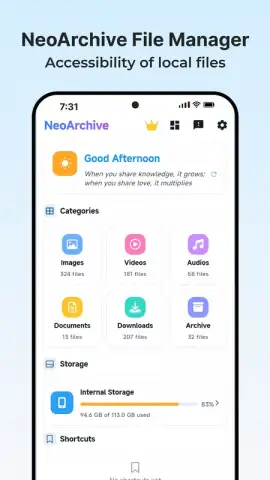
NeoArchive - File Manager provides a unified workspace to handle all your storage needs. Navigate seamlessly between internal memory, SD cards, and cloud storage connections in a clean, dual-pane interface designed for efficient file operations. The app features a robust built-in archiver that handles ZIP, RAR, and 7Z formats for compression and extraction, alongside a detailed storage analyzer that visually maps your space usage to quickly identify and remove junk. Advanced users will appreciate the root explorer capabilities, FTP server functionality for wireless file transfers, and the ability to bookmark frequently accessed directories for instant navigation.
Engineered for Power and Simplicity
The strength of NeoArchive lies in its blend of deep functionality and intuitive design. It delivers a smooth, responsive experience even when managing thousands of files or performing batch operations. The customizable home screen lets you prioritize the tools you use most, while the dark theme and various icon packs allow for personalization. Security is integrated, with options to hide private files and secure them with encryption. It’s built to handle the complex tasks without complicating the simple ones.
- Dual-Pane Explorer & Tabs for effortless drag-and-drop file management between locations.
- Integrated Archive Support to create, browse, and extract ZIP, RAR, and 7Z files on the go.
- Storage Analyzer & Cleaner with visual charts to identify large files and clear cache instantly.
- Root Access & FTP Server for advanced system file management and wireless transfers over Wi-Fi.
- Cloud & Network Drive Support to manage files from Dropbox, Google Drive, and SMB/WebDAV.
We suggest trying NeoArchive to experience a new level of clarity and control over your digital content. Consider downloading it today to streamline your workflow and reclaim your device's storage.
Requires an internet connection for certain cloud and network features. The app may contain optional in-app purchases for premium functionality.
 GooglePlay


