

OiTube
OiTube screenshots (5)


Description OiTube
A Different Way to Watch
For many users, the standard YouTube experience feels increasingly restrictive, locked behind ads and a rigid interface that demands constant screen attention. This has created a niche for alternative clients that promise greater control, with OiTube emerging as a focused contender in this space. It presents itself not as a feature-bloated replacement, but as a streamlined utility designed to solve two specific, common frustrations inherent to the official app: intrusive advertising and the inability to truly multitask with video or audio content. Its approach is pragmatic, offering a refined portal to the YouTube ecosystem with enhancements that directly alter the user's daily interaction with the platform.
Core Functionality and User Experience
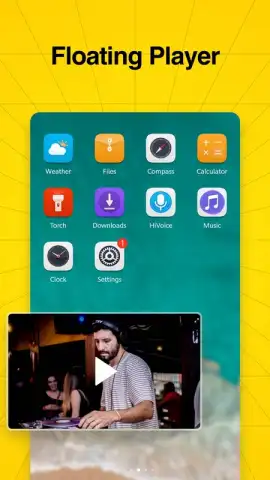
OiTube operates as a dedicated wrapper for YouTube, providing access to the entire library of videos, channels, and playlists. The primary interface will be immediately familiar to any YouTube user, ensuring there is no steep learning curve. The fundamental divergence occurs in the application's handling of playback. The most significant feature is comprehensive background and audio-only playback. When activated, this allows a video to continue playing as pure audio even when the user switches to another application or turns the device's screen off. This transforms the platform into a potent music or podcast streaming tool, enabling activities like browsing the web, checking email, or simply conserving battery while listening. A complementary picture-in-picture mode lets the video shrink into a movable, resizeable window that floats above other apps, perfect for following a tutorial while taking notes or monitoring a live stream while texting.
A second, equally critical system is the integrated ad-blocking capability, which is enabled by default. This function operates across the video feed, pre-roll slots, and mid-roll advertisements, presenting a clean, uninterrupted viewing stream. It's important to note that, unlike some other utilities, OiTube's current feature set does not include a native video downloader for offline viewing. Its value proposition is centered on enhancing the streaming experience through unimpeded access and flexible playback, rather than on content archiving. The app provides a toggle for the ad-blocking function, offering users control, though most will likely prefer it left active for a seamless experience.
Key Features at a Glance
- Background & Screen-Off Audio Playback: Listen to any video as an audio stream with the screen inactive or while using other apps.
- Floating Picture-in-Picture Window: Minimize videos into a persistent, draggable overlay for true multitasking.
- Default-Enabled Ad Blocking: Automatically suppresses video and banner advertisements for uninterrupted viewing.
We suggest trying OiTube if your primary goal is to reclaim your attention and battery life while using YouTube, transforming it into a more versatile audio and visual tool.
Download the OiTube mobile app now to experience an ad-free, multi-tasking friendly YouTube client.
Disclaimer: This application requires an active internet connection to stream content from YouTube. It does not contain in-app purchases. Users should be aware of their mobile data usage when streaming video content. The developer is not affiliated with or endorsed by YouTube/Google. Features are dependent on the stability of the YouTube service and may be subject to change.
 GooglePlay


