

OPPO Clone Phone
OPPO Clone Phone screenshots (3)
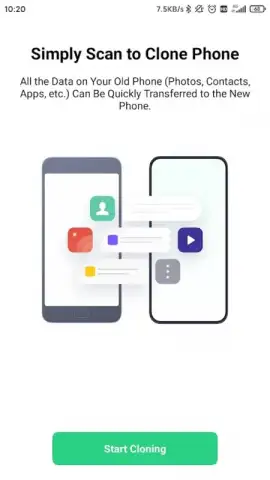
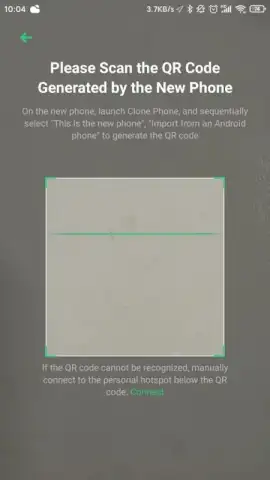
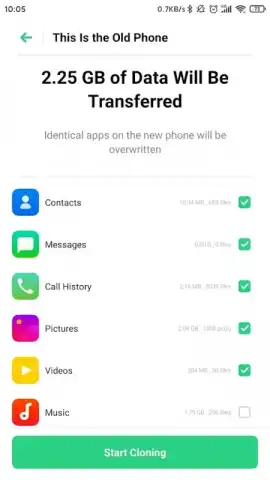
Description OPPO Clone Phone
Your New Phone is Waiting, But Your Old Life is Stuck on the Old One
You’ve just unboxed your shiny new OPPO phone. The excitement is real—until you remember the daunting task ahead. Moving your digital life feels like a chore. Your photos, your essential apps, years of chat histories, and all those little settings that make a device truly yours are trapped on your old phone. The thought of manually rebuilding everything, or risking loss with a clumsy transfer, can instantly dampen that new-device joy. What you need is a seamless bridge, a way to step directly from your old device into your new one without missing a beat or losing a single memory.
This is where the official OPPO Clone Phone app transforms the experience. Developed by ColorOS, this tool is designed to eliminate the friction of upgrading. Imagine a direct, secure tunnel between your phones. You are not just transferring files; you are cloning your entire digital ecosystem. The process is built for completeness, ensuring that what you value most—from system preferences to personal conversations—makes the journey intact. It handles the complexity so you can focus on the excitement of using your new device from the very first moment.
A Deep Dive into What Makes the Transfer Effortless
The core promise of OPPO Clone Phone is comprehensive and lossless migration. This isn't a simple file-share utility; it's a full-device migration engine. The app performs a deep scan of your old Android device, identifying and categorizing every piece of data that can be moved. The security is inherent, as the transfer creates a direct, encrypted connection between the two phones, ensuring your personal data never touches an external server. Compatibility is universal, recognizing and preserving all common file formats and data structures without corruption.
You gain precise control over what gets transferred. Before initiating the clone, you are presented with a detailed, categorized checklist. This allows you to select specific data types—like only photos from the last year, or all your contacts but not your call logs. A smart summary screen then calculates the total storage space required on your new device, giving you complete transparency and preventing any unexpected storage issues. The final step is a verification process, where you can confirm the integrity of the transfer before finalizing, ensuring nothing is left behind.
Key Features That Redefine Data Migration
- Total Ecosystem Transfer: Securely moves not just media and contacts, but also installed applications, system settings, documents, and even complete chat histories from platforms like WeChat and QQ.
- No-Cable, Traffic-Free Speed: Leverages a direct Wi-Fi connection for rapid transfers, consuming no mobile data and requiring no computer or USB cables for operation.
- Turbo-Powered Selective Control: Utilizes a Turbo mode for faster performance and provides granular settings to pick and choose exactly which files to migrate, with a clear preview of required storage space.
The process itself is remarkably straightforward. With the app installed on both your old and new OPPO devices, you simply follow the on-screen prompts to establish a connection. The interface guides you through selection and confirmation. Within minutes, not hours, your new phone is populated, personalized, and ready to go—feeling familiar from the very first unlock.
Start Using Your New OPPO Immediately
Stop delaying the joy of your upgrade. Download the OPPO Clone Phone app now and experience a transition so smooth, it feels like magic. Claim your advantage now and turn your new phone into your old familiar friend in record time.
Heads up: you'll need an active Wi-Fi connection for the transfer feature to work. Some advanced functionality or support for very old device models may vary.
 GooglePlay


