

Samsung Gallery 3D
Samsung Gallery 3D screenshots (6)





Description Samsung Gallery 3D
A Closer Look at the Default Gallery Experience on Galaxy
For many users, the pre-installed gallery app is an afterthought, a simple vault for photos. However, the Samsung Gallery 3D application represents a more considered, integrated approach to media management, designed specifically for the Samsung Galaxy ecosystem. As the official, default gallery from Samsung Electronics, it functions less as a standalone tool and more as a deeply embedded component of the device's photography workflow. Its primary role is to bring immediate order to the chaos of a modern camera roll, automatically sorting and categorizing images from the moment you take them. This review examines the mechanics of how it achieves this, along with the practical editing utilities it provides directly within the organizational interface.
Core Functionality and Integrated Editing
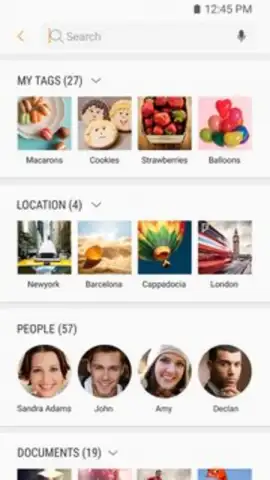
The application's most significant feature is its automatic, intelligent organization. It systematically creates distinct albums, segregating photos not just by date, but by their source application—such as the native Camera, Instagram, or WhatsApp—and by file format. This granular sorting is complemented by a robust search function that operates on two key vectors: user-applied tags and geolocation data based on where the photo was captured. This dual-layer system transforms a simple scroll into a targeted retrieval operation. Beyond curation, Samsung Gallery 3D includes a capable built-in image editor. This toolset moves beyond basic filters, offering precise adjustments for color temperature and white balance, which are critical for correcting lighting issues. Standard utilities for cropping and rotation are present, and the editor is directly linked to Bixby Vision, allowing for instant object recognition, translation, or shopping searches from any image with a single tap.
The operational environment is notably streamlined, free from banner or interstitial advertisements that can disrupt the viewing experience. This focus on a clean interface underscores its design philosophy as a core system utility.
- Automatic Album Curation: Intelligently creates albums sorted by source app and media format without manual input.
- Advanced Photo Search: Locate images instantly using custom tags or geographic location metadata from the capture.
- Precision Color Editing: Adjust critical parameters like color warmth and white balance for professional-grade corrections.
- Direct Bixby Vision Integration: Send any photo directly to Bixby for visual analysis, translation, or product discovery.
- Guaranteed Samsung Optimization: Engineered exclusively for seamless performance and stability on Samsung Galaxy smartphones.
This application consolidates essential gallery functions into a stable, ad-free environment that leverages the full hardware and software integration of its native platform. For Galaxy users, it is the optimized hub for all visual media.
Download Samsung Gallery 3D now and experience the definitive, system-level gallery tool designed for your device!
Disclaimer: This application requires a compatible Samsung Galaxy device and an internet connection for certain features like Bixby Vision and location-based search. It is a free system application and does not contain in-app purchases.


