
Screen Mirroring - Castto
Screen Mirroring - Castto screenshots (3)
Description Screen Mirroring - Castto
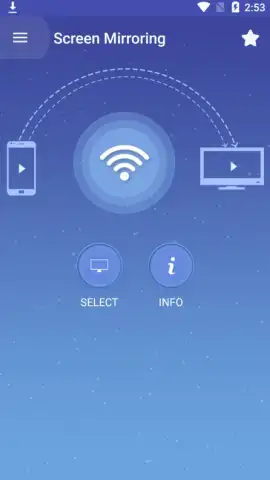
Ever wished your smartphone screen could magically appear on your big TV? What if you could instantly share videos, photos, and games with everyone in the room without any complicated cables or setups? That’s the exact experience waiting for you with Screen Mirroring - Castto. This app transforms your TV into a giant wireless extension of your Android device, making everything more immersive and shareable.
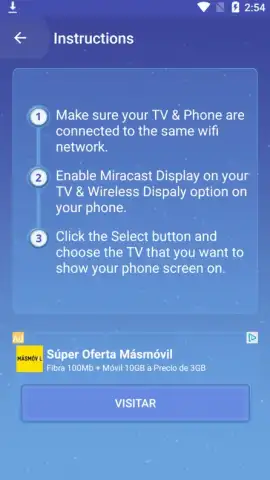
The process is designed to be effortless. You begin by ensuring both your smartphone and your TV are connected to the same Wi-Fi network. The app’s clean interface then scans for available devices, allowing you to select your television with a single tap. Within moments, your phone’s display is mirrored in real-time on the larger screen. You retain full control, navigating your phone as usual while everyone enjoys the view on the TV. This seamless connection turns your living room into a personal cinema, a photo gallery, or a gaming arena.
Core Features and Performance
Screen Mirroring - Castto is built for broad compatibility, working with the majority of modern internet-connected TVs and devices that support the Miracast standard. This wide support means you likely already have the necessary hardware. The connection is stable, designed to minimize lag so your video playback remains smooth and your gaming sessions stay responsive. The intuitive design removes technical barriers, putting the focus on your content and experience rather than on complex settings.
- One-Tap Wireless Mirroring: Establish a seamless connection between your Android device and TV with minimal setup required.
- Broad TV Compatibility: Works with most smart TVs and streaming devices that support Miracast or similar casting protocols.
- Real-Time Screen Sharing: Mirror your phone’s display live for presentations, app demos, or browsing the web on a big screen.
The app provides a straightforward path to upgrading your media consumption. Imagine streaming your favorite shows from apps not available on your TV, presenting a slideshow directly from your phone, or competing in mobile games where every detail is magnified. The Turbo feature enhances this experience by optimizing performance for smoother streaming. It’s about removing the limitations of a small screen and unlocking the full potential of your home entertainment system.
Transform your TV into a powerful second screen and share every moment in stunning detail. Get the ultimate viewing experience and start streaming today.
Download Screen Mirroring - Castto now
Disclaimer: Requires a stable internet connection and compatible TV or display device. This app may contain in-app purchases. Use of this app is subject to your device’s capabilities and network conditions. Data usage may apply. Please ensure your use complies with all applicable terms and laws.
 GooglePlay


