

Simple Notepad
Simple Notepad screenshots (8)
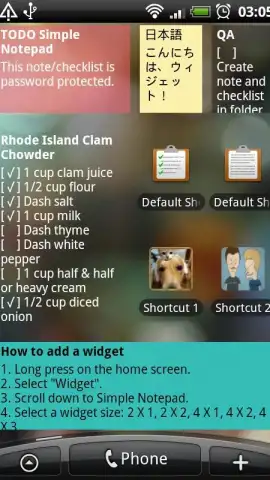




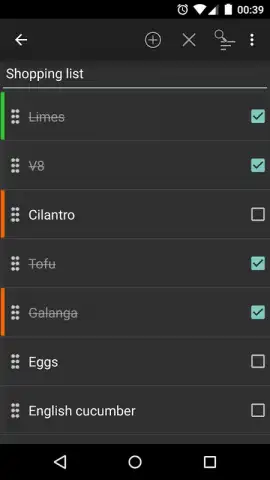


Description Simple Notepad
The Problem with Modern Note-Taking Apps
The digital note-taking space is saturated with applications that promise to organize your life, yet often achieve the opposite. Many are bloated with complex features—unnecessary formatting tools, integrated calendars, and AI assistants—that transform a simple act of jotting down a thought into a cumbersome process. This over-engineering creates a significant gap for users whose core need is fundamentally different: a clean, immediate, and distraction-free space to capture text. When your primary requirement is to quickly save a reminder, a shopping list, or a fleeting idea without navigating layers of menus, most contemporary tools feel excessively complicated. This friction points to a clear demand for software that prioritizes pure utility over feature creep, focusing on the basic mechanics of writing, storing, and retrieving text with maximum efficiency.
A Focused Examination of Simple Notepad
Simple Notepad addresses this gap not by adding more, but by strategically removing everything non-essential. Its operational philosophy is rooted in minimalism, treating the note itself as the sole interface. The application provides a straightforward text field where you can compose a note and save it directly as a reminder, integrating this basic function seamlessly into the workflow. For organization, it employs a tagging system, allowing you to assign keywords to notes, which facilitates rapid retrieval through a simple search function later. This avoids the need for complex folder hierarchies, keeping the management process as lightweight as the creation process.
The utility of Simple Notepad is significantly amplified by its robust cross-platform synchronization. The service maintains dedicated applications for iOS, Android, Mac, Linux, and offers a web browser version. All platforms connect through a single user account, ensuring that a note created on a phone is instantly accessible on a desktop computer. This ecosystem eliminates the common pain point of platform-locked notes. Furthermore, the developer, mightyfrog.org, has implemented a tier called "Turbo," which removes all advertising and unlocks enhanced collaborative and publishing capabilities. While the core experience remains deliberately simple, these advanced functions include managing version history for text documents, enabling real-time collaborative editing for teams, and the ability to automatically publish any note to a public, exclusive URL hosted on Simple Notepad's own servers.
- Save notes directly as device reminders for timely alerts and task management.
- Utilize a keyword tagging system for efficient categorization and instant search.
- Full cross-platform sync across iOS, Android, Mac, Linux, and web browsers.
- Turbo mode removes all advertisements and provides access to premium features.
- Advanced tools include document versioning, real-time collaboration, and web publishing.
We suggest trying Simple Notepad if your priority is a zero-friction writing environment that works identically across all your devices. Consider downloading it to experience note-taking stripped back to its most effective form.
Heads up: you'll need wifi for initial sync and most collaborative features. Some cool stuff, like version history and web publishing, is part of the extra Turbo tier.


