

Task Killer FREE
Task Killer FREE screenshots (4)
Description Task Killer FREE
A Simple Gesture to Reclaim Your Phone's Performance
There is a quiet frustration familiar to any smartphone user: that gradual slowdown, the stutter in animation, the battery that seems to drain while the device is idle. Often, the culprit isn't a single app but a collection of background processes—many forgotten or unnecessary—consuming precious RAM and CPU cycles. Task Killer FREE by PerfectionHolic Apps addresses this with a surgical, one-tap approach. It is not a complex system optimizer but a focused utility designed for a single, effective action: instantly terminating non-essential tasks to free up device resources and restore responsive performance.
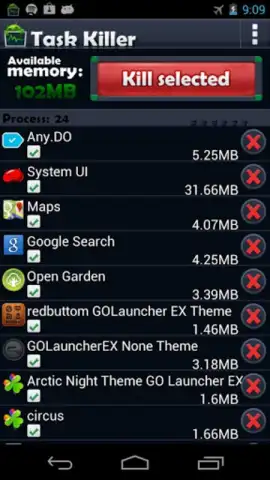
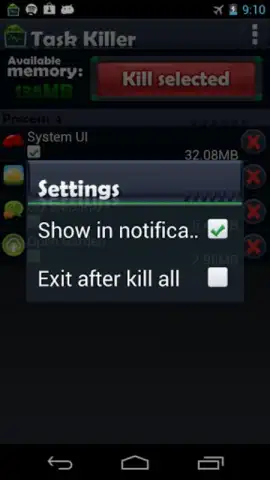
The application’s core mechanic is built around clarity and immediacy. Upon launch, it presents a comprehensive, real-time list of every active application and system process. Crucially, it displays the exact amount of memory each process is consuming, transforming abstract lag into quantifiable data. User agency is central; you manually select the few apps you wish to keep running—perhaps your music player or messaging service. With that curation complete, a single interaction with the prominent 'kill all' control halts everything else. This design philosophy extends to the interface itself, which avoids technical clutter in favor of a layout that makes the system's status immediately legible, requiring no manual configuration or understanding of advanced settings.
Operational Analysis and Feature Breakdown
Beyond the primary function, the app's value is in its focused execution and user-centric design. It operates as a discrete tool that respects device storage, occupying minimal space while delivering a tangible impact on the user experience. The absence of intrusive advertising within the core workflow is a significant note, preventing the optimization tool itself from becoming a source of interruption. The advertised 'Turbo' mode suggests a deeper, perhaps automated or one-step-further cleaning protocol, though the base functionality provides substantial control.
- One-Tap Termination of Non-Essential Background Processes and Services
- Real-Time Display of Memory Consumption for Each Active Application
- Selective Whitelisting to Protect Chosen Apps from Being Stopped
- Streamlined, Intuitive Interface Requiring No Technical Expertise to Operate
- Lightweight Application Footprint That Conserves Valuable Device Storage
The utility is straightforward: by routinely clearing the accumulated weight of background tasks, users can experience fewer performance hiccups, potentially longer battery life between charges, and a generally more responsive device. It turns system maintenance from a conceptual chore into a simple, repeatable action.
Download Task Killer FREE now and experience the immediate difference a cleaner system can make. This is an exclusive, limited-time offer for new users to access a premium-grade optimization tool at no cost.
Internet required. IAP available.


