Via Browser

Via Browser

4.6 42 ratings
51 Views
4.04 MB Size
3+ Age

Via Browser screenshots (8)

Via Browser скриншот 1
Via Browser скриншот 2
Via Browser скриншот 3
Via Browser скриншот 4
Via Browser скриншот 5
Via Browser скриншот 6
Via Browser скриншот 7
Via Browser скриншот 8

Description Via Browser

Your Phone Deserves a Browser That Gets Out of Your Way

Tired of browsers that feel bloated, slow, and demanding? Imagine an app that occupies less space than a single high-resolution photo, yet delivers a full-powered, beautiful web experience. Via Browser redefines mobile browsing by stripping away everything unnecessary, leaving you with pure speed, elegant simplicity, and complete control. This isn't just a lightweight browser; it's a thoughtfully designed tool that respects your device's resources and your time.

Experience Uncompromised Speed and Elegance

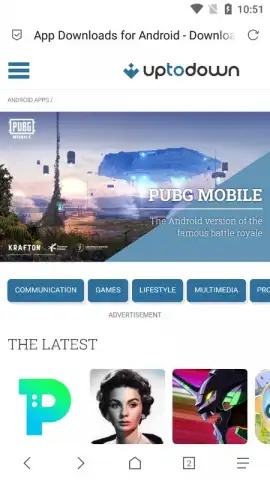
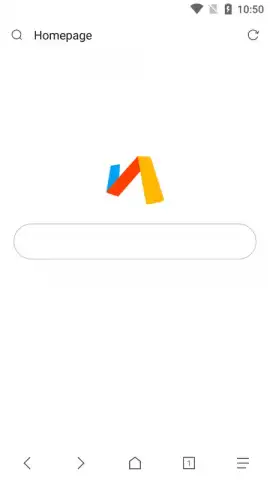
From the moment you launch Via Browser, you encounter a clean, distraction-free canvas. The interface presents a minimalist start page, inviting you to immediately begin your search. This deliberate simplicity translates into astonishing performance. Pages load swiftly, scrolling is perfectly smooth, and the entire application responds instantly to your touch. You gain a sense of fluidity and direct connection to the web, without any visual clutter or lag holding you back.

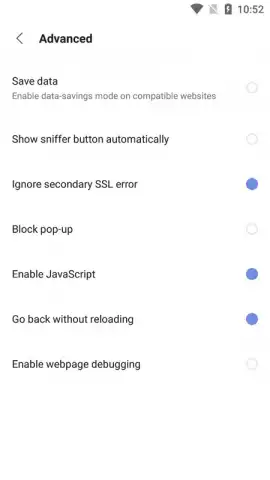
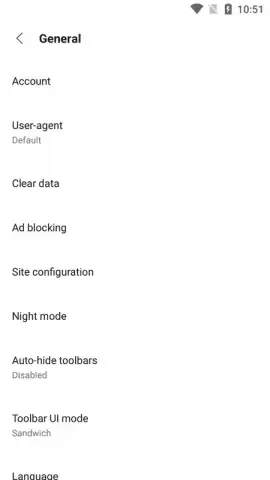
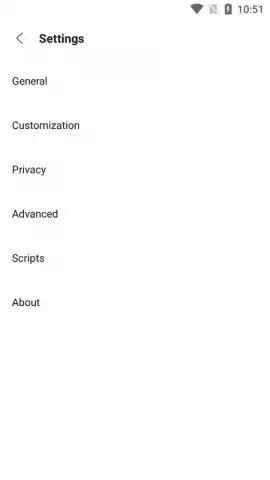
Customization is at the core of the experience. The default search engine is easily changed through a straightforward settings menu, offering immediate switches to alternatives like Yahoo, Bing, Baidu, or DuckDuckGo, with the option to manually add any other provider you prefer. Beyond search, you command the browser's behavior. Adjust default font sizes for perfect readability, toggle the pop-up ad blocker on or off with a single tap, and personalize the visual theme of your home screen to match your style.

A Deep Toolkit in a Sleek Package

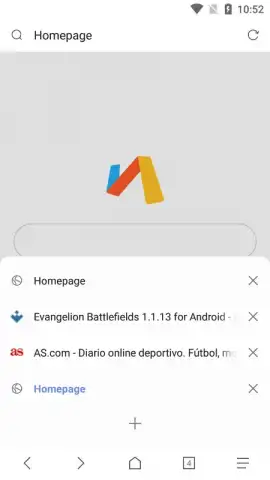
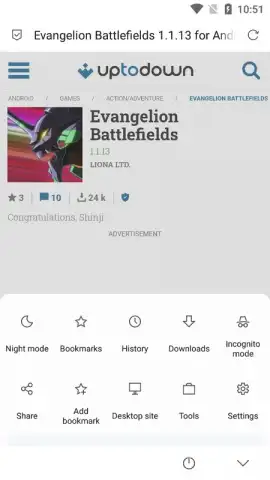
Do not mistake its minimalist design for a lack of features. Via Browser is a fully-capable, modern browser that intelligently packs advanced functionality into an accessible format. The tab management system allows you to open and seamlessly switch between countless pages. Your bookmarks are easily organized and always within reach. For private browsing, a dedicated incognito mode is just one tap away. When you encounter a mobile-optimized site that you would rather view in its desktop form, you can instantly request the full PC version. To reduce eye strain during evening browsing, a gentle night mode can be activated effortlessly.

A particularly innovative feature is the support for custom gestures. You can assign specific commands to swipes and taps, navigating the web and controlling the browser through intuitive motions that feel uniquely yours. This level of personalization, combined with the inherent efficiency of the app, creates a browsing experience that feels both powerful and personally tailored.

  • Ultra-Lightweight & Efficient: Occupies a mere fraction of your phone's storage and uses minimal RAM and battery, ensuring peak device performance.
  • Ad-Free Turbo Mode: Browse with an integrated ad-blocker for faster page loads and a cleaner, uninterrupted viewing experience.
  • Fully Customizable Search: Set your preferred search engine globally in seconds—choose from Google, Bing, DuckDuckGo, Yahoo, Baidu, or add your own.
  • Advanced Browsing Modes: Instantly switch between standard, incognito (private), desktop site request, and night mode for optimal viewing in any situation.
  • Intuitive Gesture Control: Program custom swipe and tap gestures to navigate back, forward, refresh, or open new tabs without touching buttons.
  • Deep Visual Customization: Personalize your start page, adjust default text sizes, and manage themes for a browser that looks exactly how you want.
  • Robust Tab & Bookmark Manager: Effortlessly handle multiple open tabs and organize your saved pages with a powerful, easy-to-use management system.

This is the definitive browsing solution for anyone who values speed, elegance, and efficiency on Android. It proves you do not need to sacrifice features for performance. Stop settling for slow, bulky browsers that drain your phone. Transform your mobile web experience today.

Download Via Browser now and feel the difference immediately!

Please note: This application requires an internet connection to browse the web. The app is free to download and use.

Manually checked and VirusTotal

Latest version

Version
7.0.0
Date
17.03.2026
Signature
9830874658327c15600f6e4ea939c324
Architecture
universal
GooglePlay GooglePlay

About this app

Developer
Lakor
Package name
mark.via.gp
Min. Android
Android + 4.0, 4.0.1, 4.0.2
Age
3+

Version history Via Browser

Via Browser 7.0.0
17.03.2026
4.04 MB
Via Browser 6.9.0
17.03.2026
3.96 MB
Via Browser 6.8.0
17.03.2026
3.92 MB
Via Browser 6.7.1
17.03.2026
3.8 MB
Via Browser 6.6.0
17.03.2026
3.72 MB
Via Browser 6.5.1
17.03.2026
3.61 MB
Via Browser 6.4.0
17.03.2026
3.48 MB
Via Browser 6.3.1
17.03.2026
3.43 MB
Via Browser 6.2.0
17.03.2026
2.92 MB
Via Browser 6.1.0
17.03.2026
2.9 MB
Via Browser 6.0.0
17.03.2026
2.88 MB
Via Browser 5.9.5
17.03.2026
2.86 MB
Via Browser 5.9.0
17.03.2026
2.85 MB
Via Browser 5.8.1
17.03.2026
2.83 MB
Via Browser 5.7.1
17.03.2026
2.82 MB
Via Browser 5.6.1
17.03.2026
2.79 MB
Via Browser 5.5.1
17.03.2026
2.78 MB
Via Browser 5.4.1
17.03.2026
2.76 MB
Via Browser 5.3.0
17.03.2026
2.68 MB
Via Browser 5.2.0
17.03.2026
2.67 MB
Via Browser 5.1.1
17.03.2026
2.65 MB
Via Browser 5.0.0
17.03.2026
2.74 MB
Via Browser 4.9.1
17.03.2026
2.72 MB
Via Browser 4.8.0
17.03.2026
2.67 MB
Via Browser 4.7.0
17.03.2026
2.73 MB
Via Browser 4.6.0
17.03.2026
2.47 MB
Via Browser 4.5.1
17.03.2026
2.43 MB
Via Browser 4.5.0
17.03.2026
2.43 MB
Via Browser 4.4.7
17.03.2026
2.34 MB
Via Browser 4.4.6
17.03.2026
2.32 MB
Via Browser 4.4.5
17.03.2026
2.26 MB
Via Browser 4.4.4
17.03.2026
2.26 MB
Via Browser 4.4.3
17.03.2026
2.22 MB
Via Browser 4.4.2
17.03.2026
2.2 MB
Via Browser 4.4.1
17.03.2026
2.14 MB
Via Browser 4.4.0
17.03.2026
2.14 MB
Via Browser 4.3.9
17.03.2026
2.09 MB
Via Browser 4.3.8
17.03.2026
2.06 MB
Via Browser 4.3.7
17.03.2026
1.99 MB
Via Browser 4.3.6
17.03.2026
1.96 MB
Via Browser 4.3.5
17.03.2026
1.9 MB
Via Browser 4.3.4
17.03.2026
1.81 MB
Via Browser 4.3.3
17.03.2026
1.62 MB
Via Browser 4.3.2
17.03.2026
1.61 MB
Via Browser 4.3.1
17.03.2026
1.57 MB
Via Browser 4.3.0
17.03.2026
1.53 MB
Via Browser 4.2.8
17.03.2026
1.48 MB
Via Browser 4.2.7
17.03.2026
1.44 MB
Via Browser 4.2.6
17.03.2026
1.43 MB
Via Browser 4.2.3
17.03.2026
1.27 MB
Via Browser 4.2.1
17.03.2026
1.26 MB
Via Browser 4.1.6
17.03.2026
1.21 MB
Via Browser 4.1.2
17.03.2026
1.16 MB
Via Browser 4.1.1
17.03.2026
1.15 MB
Via Browser 4.0.9
17.03.2026
1000.06 KB
Via Browser 4.0.8
17.03.2026
1000.06 KB
Via Browser 4.0.7
17.03.2026
967.91 KB
Via Browser 4.0.6
17.03.2026
967.91 KB
Via Browser 4.0.5
17.03.2026
968.26 KB
Via Browser 4.0.4
17.03.2026
968.09 KB
Via Browser 4.0.2
17.03.2026
959.55 KB
Via Browser 4.0.1
17.03.2026
959.51 KB
Via Browser 3.9.9
17.03.2026
911.6 KB
Via Browser 3.9.8
17.03.2026
904.05 KB
Via Browser 3.9.7
17.03.2026
895.87 KB
Via Browser 3.9.5
17.03.2026
891.69 KB
Via Browser 3.9.4
17.03.2026
787.69 KB
Via Browser 3.9.3
17.03.2026
783.69 KB
Via Browser 3.9.2
17.03.2026
771.92 KB
Via Browser 3.9.10
17.03.2026
935.6 KB
Via Browser 3.9.1
17.03.2026
768.08 KB
Via Browser 3.9.0
17.03.2026
772.12 KB
Via Browser 3.6.2
17.03.2026
919.21 KB
Via Browser 3.6.1
17.03.2026
914.77 KB
Via Browser 3.6.0
17.03.2026
895.1 KB
Via Browser 3.5.9
17.03.2026
891.96 KB
Via Browser 3.5.8
17.03.2026
888.18 KB
Via Browser 3.5.7
17.03.2026
887.95 KB
Via Browser 3.5.6
17.03.2026
885.78 KB
Via Browser 3.5.3
17.03.2026
871.43 KB
Via Browser 3.5.2
17.03.2026
859.45 KB
Via Browser 3.5.1
17.03.2026
842.53 KB
Via Browser 3.5.0
17.03.2026
840.05 KB
Via Browser 3.4.8
17.03.2026
819.32 KB
Via Browser 3.4.7
17.03.2026
819.04 KB
Via Browser 3.4.6
17.03.2026
766.31 KB
Via Browser 3.4.5
17.03.2026
823.75 KB
Via Browser 3.4.3
17.03.2026
822.7 KB
Via Browser 3.4.0
17.03.2026
812.12 KB
Via Browser 3.3.9
17.03.2026
811.42 KB
Via Browser 3.3.8
17.03.2026
811.45 KB
Via Browser 3.3.7
17.03.2026
785.01 KB
Via Browser 3.3.4
17.03.2026
792.75 KB
Via Browser 3.3.3
17.03.2026
791.62 KB
Via Browser 3.3.2
17.03.2026
779.27 KB
Via Browser 3.3.1
17.03.2026
450.62 KB
Via Browser 3.2.0
17.03.2026
405.09 KB
Via Browser 3.1.9
17.03.2026
401.95 KB
Via Browser 3.1.5
17.03.2026
356.21 KB
Via Browser 3.1.3
17.03.2026
350.03 KB
Via Browser 3.1.2
17.03.2026
337.57 KB
Via Browser 3.1
17.03.2026
337.58 KB
Via Browser 3.0.1
17.03.2026
305.41 KB
Via Browser 2.2.0
17.03.2026
298.99 KB
Via Browser 2.1.8
17.03.2026
308.24 KB
Via Browser 2.1.0
17.03.2026
274.51 KB
Via Browser 1.8.4
17.03.2026
257.57 KB
Via Browser 1.8.1
17.03.2026
229.09 KB

Ratings and reviews for Via Browser

4.6
42 ratings

Leave a review

9 + 8 =
Manually checked and VirusTotal
Latest version
Version
7.0.0
Date
17.03.2026
Signature
9830874658327c15600f6e4ea939c324
Architecture
universal
GooglePlay GooglePlay
About this app
Developer
Lakor
Package name
mark.via.gp
Min. Android
Android + 4.0, 4.0.1, 4.0.2
Age
3+