

VirtualXposed
VirtualXposed screenshots (2)
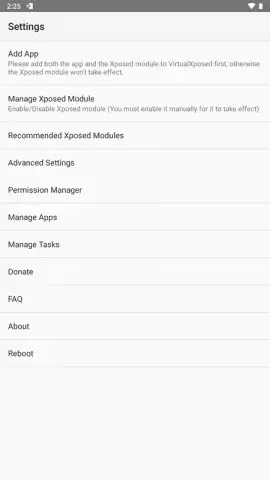

Description VirtualXposed
Unlock a New Layer of Android Customization Without Root
Tired of compromising between the apps you want to use and the stability of your system? VirtualXposed creates a completely isolated, virtual environment on your Android device, allowing you to run modified apps, experimental modules, and privacy tools safely. It’s like having a second, secret phone within your phone, where you can test and tweak without any risk to your main system or data. Experience ultimate personalization freedom.
Core Functionality & Features
VirtualXposed operates by creating a virtualized space that mimics the core framework many advanced tools require. Within this secure sandbox, you can install and activate a wide range of Xposed modules—powerful add-ons that can change everything from your system interface and app behaviors to privacy controls and performance tweaks. The primary app you wish to modify is cloned into this virtual environment, leaving your original app and system completely untouched and unchanged. This setup provides a powerful playground for customization, theming, and privacy enhancement without the permanent commitment and potential risks of rooting your device.
Key Advantages of the Virtual Environment
The standout benefit is absolute system safety; your device’s root partition remains locked, preserving your warranty and preventing boot loops. The convenience is unmatched: you can enable or disable modules on-the-fly and see changes take effect with a simple soft reboot of the virtual space, not your entire device. It supports a vast ecosystem of popular Xposed modules for theming, ad-blocking, battery optimization, and permission management, giving you granular control over your user experience. The interface is streamlined for managing multiple modules and cloned apps within the virtual container.
- Zero-Root System Modification
- Isolated App Cloning & Testing
- On-Demand Module Activation
We suggest trying VirtualXposed to safely explore the depths of Android personalization that were previously locked away.
Download VirtualXposed now and start customizing with confidence.
Disclaimer: This app requires an internet connection for initial setup and module downloads. It does not contain in-app purchases. Use of this tool should comply with app developers' terms of service. Some functions may require specific Android versions and can increase data usage. Device compatibility may vary.


