

Wifi Keys
Wifi Keys screenshots (2)
Description Wifi Keys
Unlock Nearby Wi-Fi Networks Instantly with This Essential Tool
Wifi Keys is a powerful utility designed to analyze the security of Wi-Fi networks in your immediate vicinity. It scans for networks and instantly indicates whether a default or common password can be identified, turning a complex diagnostic process into a simple visual check. This app provides a direct look at the foundational security of wireless access points, presenting data in an immediately actionable format. By highlighting networks with potentially weak, factory-set credentials, it serves as a crucial tool for both troubleshooting your own equipment and understanding local network security landscapes. The interface is built for speed, delivering key information with a single tap.
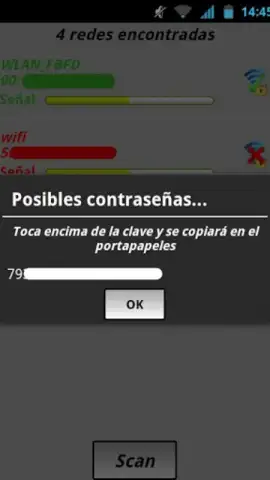
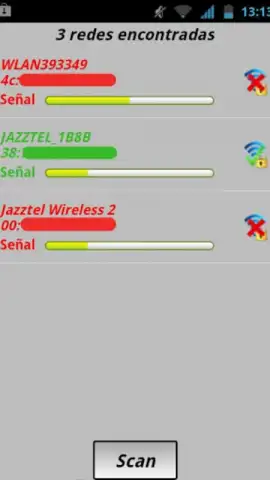
The core functionality revolves around a real-time scanner that populates a list of detectable Wi-Fi networks, each tagged with a clear color code for rapid assessment. Networks where a common password can be retrieved are highlighted in green, while others remain in red. Selecting a green-listed network reveals the specific password string, which can be copied to your device's clipboard instantly for use. This process is designed to verify if a router is still using its vulnerable default login, a common oversight that compromises network integrity. It’s important to apply this tool responsibly, primarily for auditing networks you own or manage.
Core Features at a Glance
- Real-Time Wi-Fi Network Scanner
- Visual Security Status Indicators
- One-Tap Password Copy Function
- Default Credential Database Check
We suggest trying Wifi Keys to audit your own home or office network security effortlessly. It demystifies wireless security settings and can resolve connectivity issues caused by forgotten passwords on your personal devices. Consider downloading it for a clear, immediate overview of your local Wi-Fi environment.
Heads up: you'll need an active Wi-Fi or data connection for the scanning features to function. The app requires location permissions to detect nearby networks. Use responsibly and only on networks you have permission to test.


