

AngleCam - Angular Camera
AngleCam - Angular Camera screenshots (4)

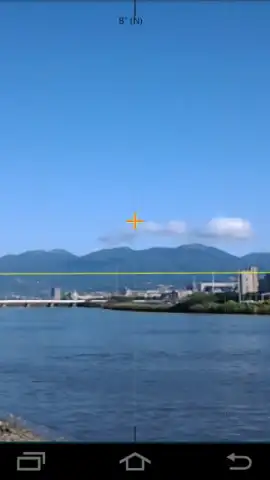


Description AngleCam - Angular Camera
A Tool for Precision, Not Just Pictures
AngleCam – Angular Camera operates in a distinct category, separating itself from standard photography apps by functioning as a metrological instrument first. It is engineered for professionals, surveyors, engineers, researchers, and dedicated enthusiasts whose work requires not just an image, but a verifiable spatial and angular data log embedded within that image. The core proposition is the seamless fusion of high-resolution photography with precise geospatial and inertial measurement unit (IMU) data, creating a comprehensive visual document for field analysis, documentation, and reporting.
Detailed Feature Analysis and Version Breakdown
The application’s primary function is to overlay critical metadata directly onto captured photographs. This includes GPS coordinates (latitude, longitude), altitude, positional accuracy, and crucially, tilt angles (pitch and roll) and magnetic azimuth. This data is not merely stored in a file’s EXIF; it is visibly rendered on the image itself, providing immediate, on-site verification. The interface typically provides real-time feedback through a virtual horizon line and digital level, aiding in capturing perfectly leveled shots even on uneven terrain. The app’s utility is entirely dependent on the hardware sensors within your device: an accelerometer for tilt and a magnetometer for azimuth. Devices lacking these sensors are directed to a companion app, NoteCam, which handles basic geo-tagged photography but excludes all angular data and leveling tools.
The developer offers a two-tiered model to accommodate different user needs. The free Lite version provides full access to the core data-capture functionality, serving as a capable proof-of-concept. However, it imposes specific constraints: all exported images carry a discreet watermark, resolution is capped at 2048x1536 pixels, and the customizable data columns (for user-added comments or labels) are limited in capacity, retaining only the ten most recent entries. Advertisements are present in this version.
The Pro version, often unlocked via a one-time purchase, removes all functional limitations. It eliminates watermarks and advertisements, unlocks the device’s maximum native camera resolution, and expands data column storage to preserve up to thirty entries per column. More significantly, it introduces advanced customization: users can add custom text or graphic watermarks, place central reticle points for targeting, and even import custom font files to match corporate or project branding guidelines. This transforms the app from a data logger into a personalized field documentation kit.
- Geospatial & Angular Data Overlay: Embeds precise GPS coordinates, altitude, tilt angles, and azimuth directly onto the image in real-time, creating a self-documenting photograph.
- Hardware-Dependent Precision Tooling: Utilizes the device’s built-in accelerometer and magnetometer to provide a live horizon line and digital level for perfectly aligned shots.
- Professional Customization Suite (Pro): Offers watermark removal, max resolution, custom text/graphic overlays, reticle points, and font imports for branded, publication-ready outputs.
We suggest trying AngleCam – Angular Camera if your photographic requirements extend beyond composition into the realm of measurable, verifiable documentation. Consider downloading the Lite version to validate its sensor integration with your device and workflow before committing to the unrestricted Pro tier for serious professional use.
Download mobile app now
Disclaimer: This application requires a persistent internet connection for initial GPS data acquisition and certain functions. It features in-app purchases to upgrade from the Lite to the Pro version. The core functionality is dependent on specific hardware sensors (accelerometer, magnetometer); performance and available features will vary by device. Data usage applies for location services. It is intended for general use; users are responsible for the accuracy of data in critical applications.
 GooglePlay


