

Battery Drain Analyzer
Battery Drain Analyzer screenshots (4)
Description Battery Drain Analyzer
Your Battery Anxiety Ends Here
Ever glance at your phone and feel that familiar pang of dread as the battery percentage dips? You’re not just watching a number fall; you’re watching your productivity, your connection, and your peace of mind drain away. What if you could finally understand why it’s happening and, more importantly, take back control? Stop guessing and start knowing with a tool designed to turn battery confusion into crystal-clear insight.
Battery Drain Analyzer transforms your Android device from a power-hungry mystery into an open book. Imagine having a personal battery consultant living right in your notification panel, giving you a constant, at-a-glance readout of your most vital stat. No more digging through settings menus. The essential data is always visible, just a swipe away. Prefer to keep an eye on things from your home screen? Activate the sleek, customizable widget. Choose a compact 1x1 square for a minimalist look or a more detailed 2x1 display, putting real-time battery health and time-remaining estimates right on your desktop for instant access.
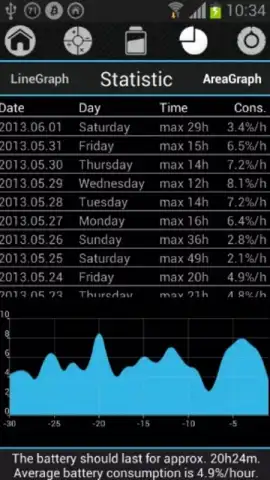
But this app goes far beyond a simple gauge. It’s about empowering you with knowledge and foresight. Dive deep into your power habits with detailed 30-day usage statistics. See exactly which patterns are costing you precious juice. The intelligent forecasting feature answers your most urgent questions: based on your current usage, how many hours do you truly have left? When you plug in, it smartly calculates the exact time remaining until a full charge, so you can plan your day perfectly. To tailor the experience to your life, the app features three distinct power profiles—Day, Night, and Saver mode. Each is engineered for specific scenarios, allowing you to optimize monitoring and alerts whether you’re working, sleeping, or conserving every last percent.
- Always-On Notification Panel: Critical battery stats live in your pull-down menu for ultimate convenience and constant awareness.
- Customizable Home Screen Widgets: Choose from 1x1 or 2x1 widget sizes to keep battery status visible right on your main desktop.
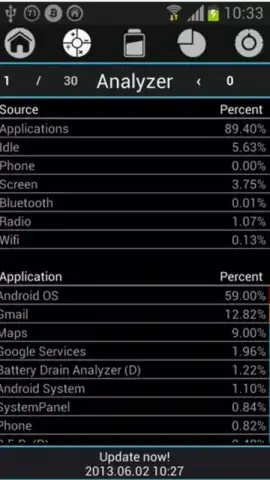
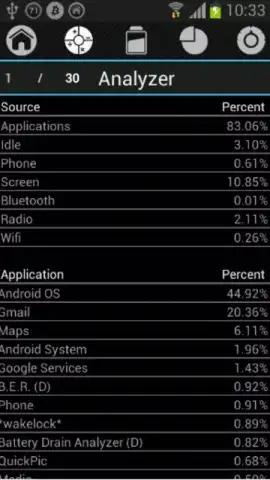
- 30-Day Battery Statistics & Analytics: Review long-term trends and consumption patterns to identify what truly drains your battery.
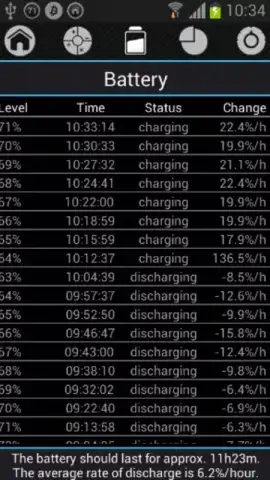
- Smart Battery Forecasting: Get accurate predictions on how long your current charge will last under present usage conditions.
- Precise Charging Timer: Know exactly how much time is left until your battery reaches 100% when plugged in.
- Adaptive Power Profiles: Seamlessly switch between optimized Day, Night, and Battery Saver modes for intelligent, context-aware monitoring.
- Turbo Experience: Enjoy a premium, ad-free interface that delivers faster insights and a completely uninterrupted user experience.
Consider downloading Battery Drain Analyzer today. It’s more than an app; it’s the clarity and control you’ve been missing. Transform how you interact with your device’s battery and never be caught off-guard by a low-power warning again.
Internet required. IAP available.


